Fill the screen with a solid color or custom image. Use Fullscreen Color Cycle mode for dynamic color transitions. Take screenshots of multiple windows without desktop clutter. Focus on one task by hiding other applications.
by Apps From Outer Space, LLC★ 0.00 ratingsUtilitiesFreeData updated 2026-09-08
Add images from Photos, iCloud, other apps, clipboard, or URLs. Tap to view fullscreen with optional titles. Randomize images every 15 minutes to daily. Adjust positions and zoom. Swipe between images.
Use front camera for real-time application and self-viewing. Apply filters like cartoon, sketch, and X-ray for styled photos. Zoom in 1x to 4x for detailed inspection. Activate flashlight for better lighting during application.
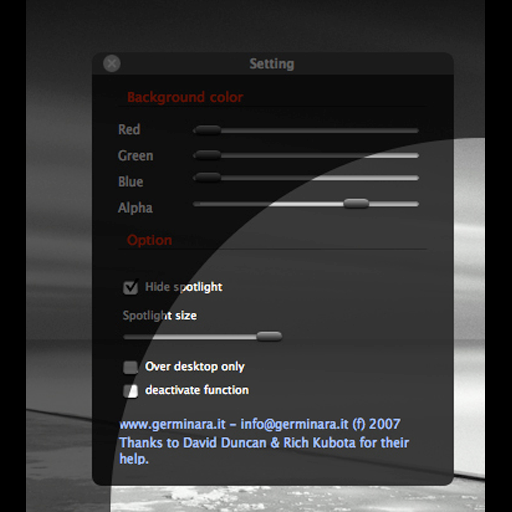
Adjust screen brightness with a spotlight beam that follows the mouse pointer. Set spotlight size and dimmer background color. Toggle the effect using CMD ALT and access settings with CTRL ALT.
Set alarms with customizable for the icon, , and interface. Choose multiple tones and preset volumes. Lock alarms to prevent silencing. Add personalized music to sounds. Adjust for the and interface.
Explore gradients for design projects. Generate random two-color gradients with over 250 trillion unique options. Tap the screen edge to cycle through variations. Save and share preferred gradients for use in creative work.
With customizable buttons featuring color selection, goal tracking, and or countdown modes. Set step sizes and create widgets for home screen access. Includes haptic and acoustic feedback with optional in- donations.
Displays the current time and date in large, readable text. Swipe up to access settings. Choose between 12-hour and 24-hour time format. Select date display options. Toggle visibility of the date and seconds.
A opens a pre-configured website and hides the status bar. Users can configure top and bottom screen edges. Swipe gestures navigate back and forward. No navigation bar enables immersive browsing.
Merges into a single image by automatically aligning them. Users can adjust margins manually for custom collages. Screen content can be recorded and saved as a continuous image. Supports webpages, articles, and instructional content.
Hide clutter with customizable background images. Drag files or use file dialog to set images. Take screenshots with clean, distraction-free backgrounds. Organize workspace and maintain focus during tasks.
Tracks time until or specific events. Set custom dates and receive notifications. Add events as widgets on the home screen. Support light and dark mode. in , weeks, months, hours, and minutes. Sync across devices.