Displays the current time and date in large, readable text. Swipe up to access settings. Choose between 12-hour and 24-hour time format. Select date display options. Toggle visibility of the date and seconds.
by Spencer Halse★ 4.936 ratingsUtilitiesFreeData updated 2026-09-06
Using custom transitions. Select or from the library. Apply dissolve or fade transitions between clips. Adjust volume and trim video clips. Set photo durations and choose orientation. Save to Camera Roll or share to social media directly.
A browser allows users to navigate the web, bookmark pages, and manage history. It supports multiple tabs, downloads files, and enables password saving. Users can customize settings and access built-in tools for privacy and security.
– Time Zone displays current time, date, and time zones. It includes real-time , dual , and city list widgets. Users can customize colors and images, switch temperature units, and convert time zones.
Provide turn-by-turn navigation with real-time GPS and live traffic updates. Compare multiple routes by time and distance. Recalculate routes dynamically as you drive. Control music, contacts, and other vehicle features from the iPhone interface.
Track time with real-time , timer, and countdown functions. Display time in seconds or milliseconds. Customize time format and appearance. Integrate with or desktop interface. Adjust position and transparency. Set alarms and reminders.
Lock photos, videos, contacts, notes, and passwords with Face ID, Touch ID, or a PIN. Hide content in a private . Store data locally or in private iCloud. Access secured content through the interface.
Display on the lock screen and dynamic island. Customize text and background appearance. Add up to 5 . Underline, strikethrough, and track with a 12-hour timer. Hide as needed.
Research and analyze and numerology with text input options for single lines or paragraphs. View multiple cipher values simultaneously. Explore detailed cipher breakdowns including letter and word values, total values, and alternate letter values.
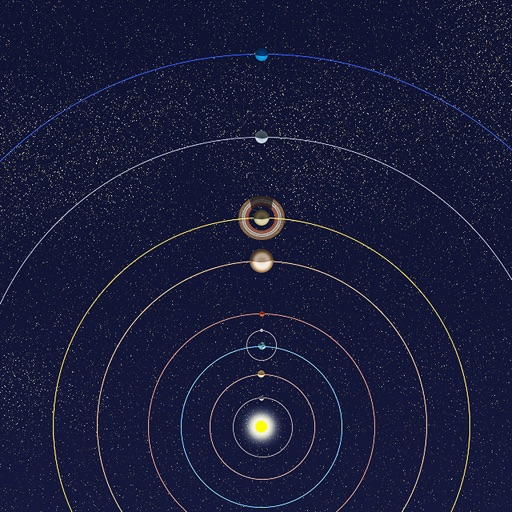
View positions of all solar system planets at any date. Adjust time to see real-time movements. Display accurate orbit sizes, eccentricity, and orbital shapes based on NASA data. Show realistic planet sizes relative to each other.
Displays current speed in both miles per hour and kilometers per hour. Automatically switches speed units based on the country's standard. Shows real-time speed data from the device's sensors.
Check timezones and location facts for cities worldwide. Add multiple to home screen. Customize background and appearance. View current time and date for selected locations.
Customize Apple with a wide selection of designs and photos. Choose from live and wallpapers. Browse and apply new to personalize the device appearance.
A clock with 24-hour display in portrait and landscape modes. Set alarms in 10-minute increments with customizable sound, vibration, and screen blinking. Disable automatic locking while active. Requires charging for alarm functionality.
Track game time with adjustable duration and increment settings. Start, pause, and modify remaining time during play. Supports Bronstein and Fischer increment styles. Customize appearance with large fonts. No advertisements.
Manage tasks with infinite checklists and customizable widgets for Home Screen. Sync checklists across devices via iCloud. Toggle items directly from widgets on iOS 17.
Create timers for upcoming events and dates. Set reminders for birthdays, diet periods, workouts, and holidays. View remaining time in days, hours, minutes, and seconds. Receive notifications when time is up.