
Calculator +
Sarah Ragab
Simple, usable, and beautiful calculator.
The app offers a free basic and scientific calculator with an intuitive interface. It displays equations and results simultaneously, supporting fractions and percentages.
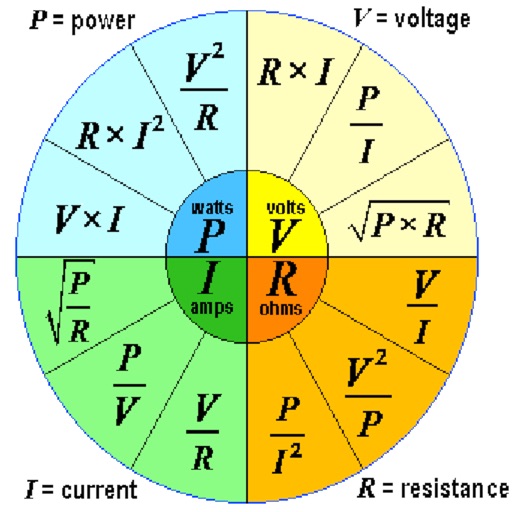
Calculate voltage, current, resistance, and power
Calculate voltage, current, resistance, or electric power by entering any two values. Convert results between normal and scientific notation. Display calculated values clearly.
Showing 41–60 of 1,000 ranked alternatives.
Sarah Ragab
Simple, usable, and beautiful calculator.
The app offers a free basic and scientific calculator with an intuitive interface. It displays equations and results simultaneously, supporting fractions and percentages.


Phan Nhat Đang
Calculate stairs parameters and steps
Calculate parameters based on run or total run input. Support multiple units for measurements. Determine maximum and minimum step sets. Copy results to clipboard. Access all features with unlimited subscription.


Mustafa Mohammed
Calculate circuits, convert units, test experiments
Solve electrical problems by calculating voltage, current, and resistance. Input values to determine unknown variables. Perform unit conversions and conduct experiments. Store and retrieve calculation results.

Behzad Dogahe
Calculate and probabilities
Perform basic statistical calculations, create and edit data lists, and generate summary . Calculate regression models and probability distributions. Unlock advanced features and larger list capacities via in- purchase.

Bitco Software LLC
Drag results to memory buttons
Perform calculations and copy results to the clipboard. Use memory buttons to store and reuse values. Convert units, calculate debt with amortization schedules, and access current currency rates.

V PUGAZHENTHI
Calculate for geometric shapes
Calculate for cube, cuboid, capsule, cone, cylinder, conical frustum, square pyramid, sphere, hemisphere, and torus. Input dimensions and select units. Display formulas used. Share results via email, social media, or messaging apps.

tasser gyati
Calculate, convert, and solve equations
Offers standard and advanced math functions including percent, negative sign, memory, brackets, and history. It includes trigonometry, roots, exponents, and logarithms.

Tue Nguyen Minh
Calculate and with a measure display
Convert measurements between , , and centimeters. Input fractions or decimals for precise calculations. View results on a visual measure display. Perform addition, subtraction, multiplication, and division with measurement values.

Pro Certs Software Ltd
Calculate , , and
Calculate electrical power for single phase systems by converting between , , and . Input values to solve for unknowns. Support for three phase calculations including kilowatts, , , and power factor.
Pheinex, LLC
Calculate size and performance
Calculate size for round or rectangular ductwork. Adjust airflow, diameter, width, or height using sliders. Enter values directly for precise measurements. Lock friction calculations for accurate results.

Cider Software LLC
Convert units and currencies instantly
A and unit/currency with a clean interface. Convert between 500+ units across 29 categories and 161 currencies. Customize colors and display selected units. Enter values to instantly convert between units.

Ahmad Almazeedi
Calculate, voice input, copy, paste
Perform calculations using a scientific or voice input. Access calculation history by swiping down. Copy and paste values. Switch between light and dark themes. Enable larger buttons for easier use.

Tim Burrow
Calculate output voltage and power after attenuation
Calculate output voltage, power, and attenuation based on input voltage and dB loss. Specify impedance for accurate results. Convert between Watts, dBm, and dB values. Calculate NMR pulses using reference power and pulse length.

RV AppStudios LLC
Convert across 12 categories
Convert across 12 categories and 140+ . Tap to select , swipe to switch values. Adjust options easily. View results instantly without complex steps.

Tran Duy
Graph functions and trace curves
Allows users to plot functions, polar, and parametric graphs. Users can edit equations in the graph editor and view graphs. Features include tracing, finding intersections and extrema, displaying derivatives, and adding tangents.

Calculated Industries, Inc.
Calculate mortgage payments on the go
Calculate mortgage payments, estimate closing costs, and determine loan amounts. Input property details and interest rates. Generate reports and save calculations. Share results via email or cloud storage. Sync data across devices.

Noriyasu Kutsuzawa
Calculate shape dimensions and area
Calculate lengths, angles, and area of shapes. Select a shape from a list. Input values into text boxes linked to orange points. Adjust point positions using the NEXT button or tapping points.

Rajendran Sajith Sajindran
Convert with precision and speed
Convert across 20 categories including length, weight, temperature, and more. Perform real-time conversions with 8-decimal precision. Switch between metric and imperial systems. Use scientific notation and dark mode.
Apps are ranked by functional similarity, category fit, rating confidence, and popularity.