Apps Like Basic Electronic Calculator for iPhone and iPad
Calculate voltage, current, resistance, and power
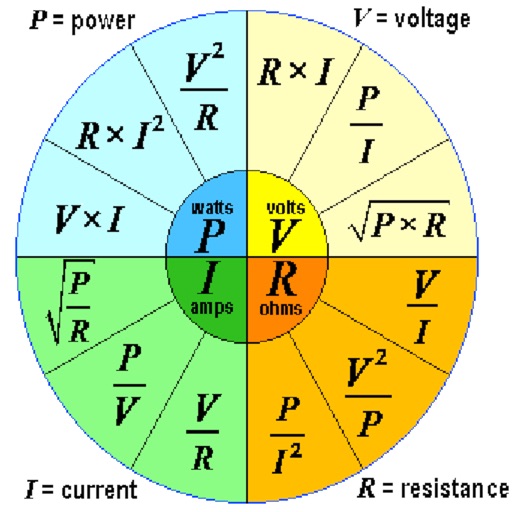
Calculate voltage, current, resistance, or electric power by entering any two values. Convert results between normal and scientific notation. Display calculated values clearly.
by Gergely Nagy★ 3.52 ratingsUtilitiesFreeData updated 2026-09-08
Convert across 20 categories including length, weight, temperature, and more. Perform real-time conversions with 8-decimal precision. Switch between metric and imperial systems. Use scientific notation and dark mode.
Perform arithmetic operations with a simple interface. View current calculations and track history. Supports universal device compatibility. No advanced or engineering functions included.
TriangleCalc calculates triangle side lengths and angles by entering two values. Automatically computes remaining sides and angles. Displays results in clear numerical format. Supports basic trigonometric calculations for triangles.
Calculate loads, voltage drops, and conductor sizes according to NEC codes. Verify compliance for residential and commercial projects. Access code references for 2002–2023 editions. Perform wire sizing, panel scheduling, and circuit calculations.
Snap and scribble to solve math problems. Perform basic, scientific, and fraction calculations. Convert currencies and view calculation history. Customize themes and use an intuitive design.
Perform complex calculations with scientific, engineering, and hexadecimal modes. Use RPN and multi-line display. Convert units and access constants. Undo and redo actions. Sync with Apple Watch for on-the-go calculations.
Calculate differences between two numbers. Input values and view results. Compare multiple pairs of numbers in separate tabs. Export calculations as text or share via email.
Calculator lets users perform basic and scientific calculations with over 30 functions. Switch between portrait and landscape modes. Customize leather color and background texture on iPad. Take notes or draw directly on the interface.
Resistance values by entering SMD codes or color combinations. Convert values instantly. Display results in ohms, kilohms, and megohms. Automatically calculate tolerance and percentage deviation. Export data as text or share via email.
Calculate power levels in dBm and watt with addition and subtraction. Convert between dBm, dBW, mW, W, mV, V, dBV, dBµV, and dBu. Adjust for impedance. Perform voltage calculations for correlated and uncorrelated values.
Calculate values using Ohm’s Law with inputs for voltage, current, and resistance. Determine power with formulas for watts, amps, and volts. Convert between units like volts, amps, and kilowatts. Store frequently used values for quick access.
Learn about resistors and resistance with interactive simulations. Configure up to eight component sections. Measure voltages across resistors and current through series and parallel circuits. Solve electrical circuits.
Calculate coordinates and grid squares for projects
Offers calculators for designing radios and antennas. Users can find latitude and longitude from a maidenhead square or vice versa. Calculate distances between squares. Convert units. Locate current position.
Allows users to calculate electrical values with tools like Power, Delta-Wye, AWG, Voltage Drop, Ampacity, THD, Resistor Code, and LED Info. Users input component values to get results. The supports dark and light themes.
The app calculates Ohm's law and power law relationships. Users can fix two electrical parameters to calculate the other two, allowing for rapid "what-if" recalculations.
Calculate pressure and temperature values for refrigerants. Input pressure or temperature to automatically compute the other. Display superheat and subcool values. Show saturated vapor and liquid values for blends. Switch between refrigerant types.
The app offers scientific and standard modes with over 30 scientific operations. It supports degrees and radians, parentheses, and output in decimal or scientific notation.
Calculate percentages, find the total, or determine the part. Input two values to automatically compute the third. View detailed step-by-step calculations. Share the complete solution with others.
Edit schematics, calculate values, and test circuits
Manage components with a database of resistors, capacitors, and diodes. Calculate circuit values using Ohm’s Law and power formulas. Access schematics, datasheets, and component symbols. Convert units and view component ratings.