Add to your home screen with customizable options. Choose from 76 , including 32 free ones. Purchase Pro for additional . Display time in 12 or 24-hour format. Supports iOS 14 and above.
Track crew hours using GPS for automatic clock-in and clock-out. Log travel for material runs. View accurate hours by employee, crew, and project. Edit or adjust entries in real . Delegate clocking tasks to staff or manage manually.
Displays the current time and date in large, readable text. Swipe up to access settings. Choose between 12-hour and 24-hour time format. Select date display options. Toggle visibility of the date and seconds.
Customize device appearance and functionality with . Add dynamic home screen and lock screen . Choose from horoscopes, countdowns, and other themes. Adjust layouts and styles to match personal preferences.
Display time with a , digital , and disc widgets. View a full-screen for prominent time display. Track progress with a progress bar widget. Access a Friday calendar widget. Adjust angles for different viewing positions.
Manage work schedules by punching in/out via Geo Clocks or Web Clocks. Pick up open shifts, swap shifts with coworkers, or drop shifts. View pay stubs, W2 statements, and benefit plan details. Request time off and punch corrections.
Offers unique home screen with exclusive design styles. Features include morse code clocks, dot matrix displays, word clocks, and dayloader progress clocks. Users can preview calendars and weather directly on the home screen.
Displays time in digital, analog, and 3D formats. Set alarms, timers, and stopwatches. View world clocks and switch between light and dark themes. Customize appearance and language settings. Enter fullscreen landscape mode for larger display.
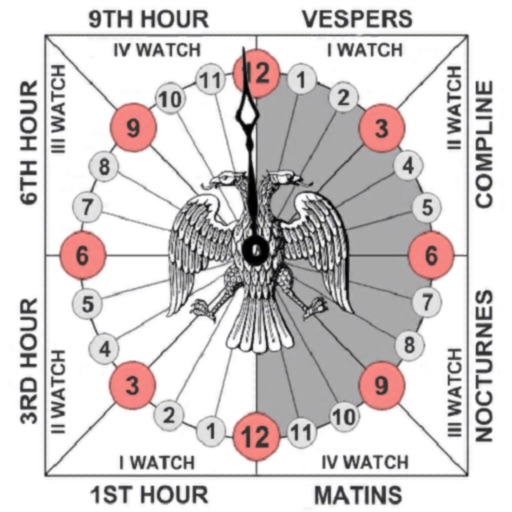
Track prayer times based on time calculations. Adjust for location using GPS or manual input of coordinates. Display times in 12-hour format starting at evening. Include historical context about ancient Judean timekeeping methods.