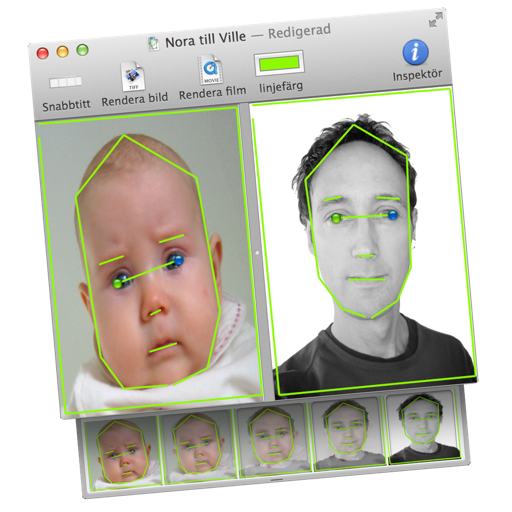
Transform images or videos by dragging two images into the document. Define similar areas with lines to create morphed transitions. Save results as still images or animated QuickTime movies.
by Martin Wennerberg★ 0.00 ratingsPhoto & VideoFreeData updated 2026-09-06
Create images and videos in any style with generative AI. Generate consistent characters, objects, and locations. Use Chat Mode to generate content through conversational interface. Transfer assets from desktop account.
UNIVERLIST TEKNOLOJI SANAYI VE TICARET ANONIM SIRKETI
Create videos from text and photos
Create animated HD videos from text or images. Add transitions, music, and text overlays. Edit clips, adjust timing, and export in various formats. Share directly to social platforms.
Create professional headshots, Christmas and polaroid style photos, and trendy profile images. Edit and enhance photos with AI tools. Export and share finished images directly.
Stitch screenshots into a single continuous image. Align and merge overlapping images automatically. Share long conversations, recipes, articles, comment threads, and to-do lists as one image. Supports all major apps.
Create AI-generated art, images, and videos from text prompts using -E 2 and -E 3. Adjust settings to refine output. Save and share generated content directly.
Edit photos and videos with AI-enhanced filters, animated effects, and advanced adjustments. Apply customizable effects to enhance scenes. Add text, stickers, and transitions. Export in various formats and share directly.
Set and lock screen images from a large collection. Access iMessage stickers and messages. Download new content regularly. Customize themes and apply them to devices. Share with others.
Create and edit images using AI-generated art and editing tools. Transform text into images with AI. Adjust colors, crop, and apply filters. Save and share edited images directly.
Edit photos with AI filters, style transformations, and Nano Banana trend effects. Restore old photos by enhancing details and repairing scratches and fading. Create videos with AI tools, turn images into anime, game avatars, or action figures.
Create and edit images with basic drawing tools. Draw freehand or use shapes and lines. Add text and colors. Save and share drawings directly. Import and modify existing images.
Photos to save storage space. Adjust JPG compression strength and image size reduction. single images, multiple files, or entire albums. Preview compressed results before saving.
Capture photos and videos with a Glitter effect for enhanced visual appeal. Edit media from the gallery. Create kirakiragraphs from still images. Swipe left or right to navigate.
Edit photos with twisting, morphing, pinching, and warping tools. Apply 800+ free in . Record videos with , pause to change them mid-recording. Add music from device library. Export and share edited media.
Edit photos with advanced filters, color adjustments, and mathematical transforms. Apply custom brushes and import Photoshop brushes, curves, and fonts. Repaint images and export in various formats. Share edited work on Instagram.
Edit photos with , cropping, and adjustment tools. Add text, stickers, and effects. Export in multiple formats and share directly. Supports videos, Live Photos, and works across iOS and Mac devices.
Create stickers by drawing lines to separate objects from photos. Store and share stickers via social media or messaging apps. Use stickers to design collages and combine with photos for creative images.
Create animated live photos and moving backgrounds with motion effects. Add animations to static images. Edit videos with transition effects and background motion. Share finished animations directly from the .