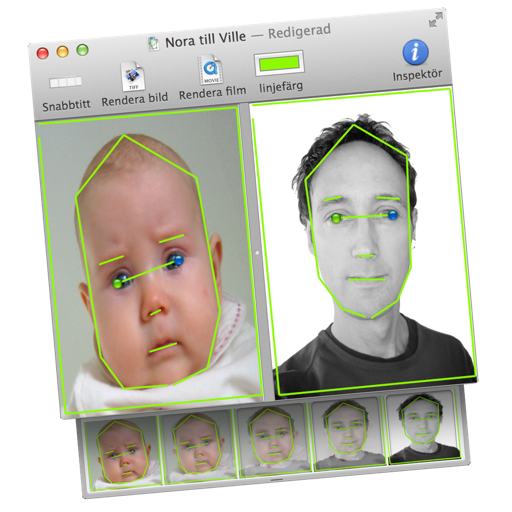
Transform images or videos by dragging two images into the document. Define similar areas with lines to create morphed transitions. Save results as still images or animated QuickTime movies.
by Martin Wennerberg★ 0.00 ratingsPhoto & VideoFreeData updated 2026-09-06
Remove unwanted objects from photos by deleting people, logos, watermarks, or text. Use intelligent fill to replace removed areas with appropriate background textures. Edit images directly in the and save the modified versions.
Restore old photos and enhance image quality using AI-powered tools. Adjust colors, clarity, and brightness. Convert static images into animated videos. Share restored photos and animations directly.
Create looping videos with natural motion and still images. Adjust timing, opacity, and transitions. Export in multiple formats and share directly. Add text and stickers. Sync with desktop version for advanced editing.
Edit images with drawing tools like rectangles, ovals, arrows, lines, and text. Add notes and highlights. Adjust colors and brightness. Save and share annotated images directly.
Edit photos by dragging, resizing, or shrinking body parts to simulate transformations. Adjust facial features like nose, chin, and buttocks. Save and share modified images directly. Apply warping effects for fun or social media use.
Turn static images into animated videos using pre-designed templates. Add motion to characters, set scene transitions, and customize effects. Export and share finished animations directly.
Edit photos with filters, cropping, and AI enhancements. Create AI-generated art and avatars from images. Convert photos into animated videos with motion and effects. Design custom layouts and export in various formats.
Create high-quality videos with editing tools and an AI . Add music, apply filters, and use transitions or animations. Edit from scratch using templates or customize existing videos. Share finished projects directly.
Create videos from text with automated scene generation and customizable styles. Convert images to animated videos using text prompts. Transform sketches into detailed images with AI enhancements. Export and share final videos directly.
Add grids to images with 5 types including rectangle and square options. Customize lines with RGB colors. Adjust rows and columns or set row height and column width. Export edited images.
Create slide shows from photos with transitions and background music. Organize images, adjust photo duration, and add personal songs. Share videos on social media or save to the camera roll.
Browse high-quality design images updated daily. Search for interior and exterior . Save and share favorite images. View detailed categories for different room types. Explore trending and classic styles.
Convert images to or PNG formats. Supports HEIF/HEIC and common types. Converted files are saved to the Photos with automatic album creation. Allows conversion of PNG to for printing.
Extract high-quality photos from videos or Live Photos. Select individual frames to save as images. Share extracted photos directly from the . Supports burst extraction and offers precise frame selection.
Edit photos to create funny cartoons, caricatures, and sketches with 9 styles. Apply filters and adjust details for high-resolution output. Convert videos into clips using live preview or one-tap conversion. Share edited content directly.