The app calculates the proportion between two values expressed in percent. It allows users to find the percent increase or decrease between two values.
by Piet Jonas★ 3.02 ratingsUtilities$0.99Data updated 2026-09-12
Lets users switch between basic and scientific modes with over 30 operations. Customize leather color and background texture on iPad. Use portrait or landscape orientation on iPad. Take notes or draw on the screen.
The app allows users to enter and modify formulas while checking them, preventing errors. It provides a history of formulas and answers, supporting various number systems and memory functions for calculations.
The app provides basic arithmetic calculations with a two-line display and a paper tape. It shows the calculation formula and its result simultaneously, featuring large buttons for ease of use.
IEP Scheduler calculates dates for upcoming evaluations and timelines. Tally This tracks counts during therapy sessions. Percent Right computes percentage correct during trials. Age Finder determines client ages based on birthdates.
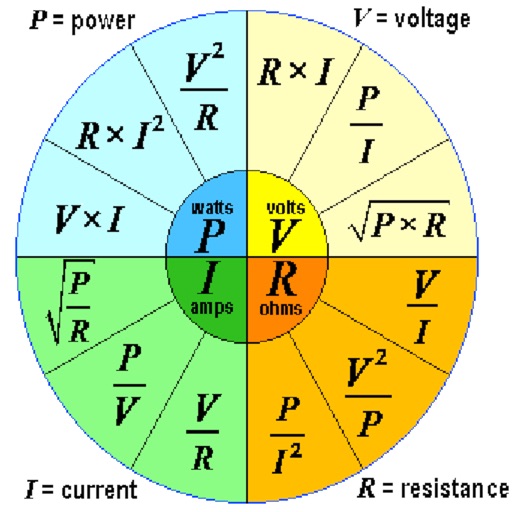
Calculate electrical circuit values by entering two known variables (current, resistance, voltage, or power). Adjust units dynamically for accurate results. Display total resistance and power in the circuit.
Arc+ calculates radius, length, width, height, and tangent by inputting two known values. Converts between measurement units. Saves results to a favorites list and shares them with others.
Calculate percentages, discounts, and tips. Input total cost, tip , and number of people to determine total value, tip amount, and individual share. Set currency preferences and perform -based calculations.
Calculate mathematical functions with precise fractional results using square roots. Input integers, rational, or irrational numbers. Convert results to decimal. Compute f(α), f(β), and their sum for two variable inputs.
Calculate voltage, current, resistance, or electric power by entering any two values. Convert results between normal and scientific notation. Display calculated values clearly.
Calculate one-rep max for strength training exercises. Track progress over time for different lifts. Input weight and reps to estimate 1RM. Save and view historical max values for multiple exercises.
TriangleCalc calculates triangle side lengths and angles by entering two values. Automatically computes remaining sides and angles. Displays results in clear numerical format. Supports basic trigonometric calculations for triangles.
Solve problems by entering three of four variables. Perform calculations using the . Store input history and view detailed solutions. Support entering fractions, decimals, and constants. Remove ads for an ad-free experience.
Calculate , transverse strain, or axial strain using built-in formulas. Input values in various units and receive results with up to 16 decimal places. Copy results to other apps for further use.