My PaintBrush: Paint and Edit
Create smooth images with tools.
etinysoft Inc.
iPhone Screenshots



Description
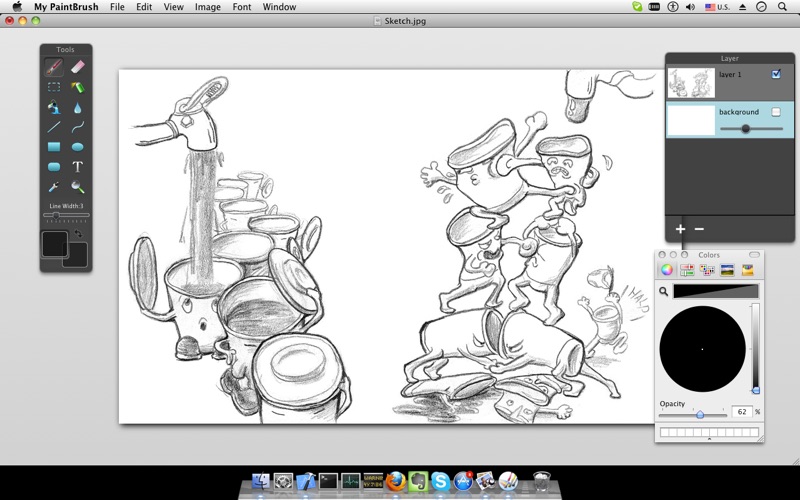
The app offers multilayer paint and image editing with tools like erasers, fill tools, and color pickers. Users can manage multiple layers, adjust alpha values, and change layer visibility and order.
My PaintBrush is a useful multilayer paint and image editor. Use inspiring tools and brushes to create smooth images.
My PaintBrush features highlights:
1 ) Familiar preset tools
• Erasers, Fill tools, Colorpicker, Zoom In.
• Straight lines, Curves, Rectangles, Rounded-rectangles, Ellipses.
• Text: customize font, size, color of text.
• Palette: set the foreground and background color for tools.
2 ) Build up and manage multiple layers:
• Merge or combine layers.
• Set the alpha value of individual layer.
• Customize the layer to be visible or not.
• Freely Change the order of layers.
• Delete unwanted layers.
3) Operations on each layer
• 10 times undo/redo.
• Flip horizontally and vertically.
• Move selected zone
4) Export to:
• PNG, JPEG, TIFF, BMP, GIF
• MPB (contains layers information)
My PaintBrush Copyright © 2014 - 2019 eTinySoft.Inc.
Based on PaintBrush Copyright © 2007-2010 Soggy Waffles.
Licensed under the GNU General Public License v3.
My PaintBrush source code:
https://github.com/hansewu/My-PaintBrush
Feedback:
Any suggestion about My Paintbrush will be appreciated, support email: [email protected]