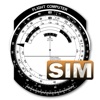
A utility simulates an E6B slide ruler for aircraft pilots. Perform conversions, wind corrections for low and high speed. Rotate, slide, and pinch zoom for precise control. Includes three calculation modes.
by Diego Rodrigues★ 4.529 ratingsUtilitiesFreeData updated 2026-09-09
Distances with a 5-meter by aligning the phone on a surface and sliding it for accurate readings. Use mode to small objects by placing the phone between them and viewing the result. Save and share measurement data directly.
Object lengths using Augmented Reality. Point the device at an object to get precise measurements. Save and share results. Works with ARKit for accurate tracking.
Use AR for length and distance measurements. Measure height with AR technology. Check decibels, angles, and level accuracy. View HD and compass directions. Monitor barometric pressure and altitude. Use with adjustable brightness and strobe.
Calculate dimensions, convert units, and perform angle and rafter measurements. Estimate material quantities and layout stairs. Input measurements for precise calculations. Save and reuse formulas for repeated tasks.
Use AR technology to measure lengths, heights, and angles by pointing the camera at objects. Capture and save measurements with the photo . Check alignment using the built-in level tool.
Perform basic arithmetic, scientific calculations, and programmer-specific conversions. Save results to a history log. Switch between different calculation modes and unit conversions.
Measure size using camera with AR technology or place on screen within a designated circle. View diameter and size results. Save measurements for future reference.
Control lights remotely via Apple Watch. Use spirit level, compass, and ruler for measurements. Access flashlight with sound effects. All are free and easy to use.
Simulates avionics system interface for training. Allows users to explore features and operational aspects. Supports loading flight plans and practicing pre-flight procedures. Integrates with pilot's guide for enhanced learning.
Dimensions, spacing, and angles in screenshots and photos. Analyze color values, grid alignment, and element positions. Export measurements and compare dimensions across images.
Log time segments and calculate total time with Time. View block and duty intervals to manage scheduling. Perform preflight performance checks using aviation-specific calculations.
The app provides a simple and intuitive interface for performing calculations. It supports multiple number systems and includes various conversion tools.
Track details including arrival and departure, aircraft type, takeoff and landing times, landing count, pilot in command, IFR status, and night flights. Add notes and remarks. Sync entries across devices. Unlock full features with a Pro in- purchase.