
SymmetPical
yukihiro fujita
Change photos to symmetrical images easily.
The app allows users to change a selected photo into a symmetrical image. Users can drag to edit, change the base side, and save their edited images.
Measure joint range of motion easily.
The app measures joint range of motion from a camera image or a saved image. Users can take a photo, select an image, point the center of a circle, and move lines to display the angle between them.
Showing 121–140 of 1,000 ranked alternatives.
yukihiro fujita
Change photos to symmetrical images easily.
The app allows users to change a selected photo into a symmetrical image. Users can drag to edit, change the base side, and save their edited images.

Empowerment Technologies Inc
View cameras remotely from anywhere.
The app connects to Defender 22800+ series NVRs, enabling remote viewing of live camera feeds and recorded footage. Users can connect to multiple NVRs to monitor up to 32 cameras and save image snapshots.

嘉伟 戈
Screen, edit video, share content
Screen content and import it into the . Select from 360-degree phone shell templates and various angles. Use one-click intelligent synthesis to enhance visual effects. Upload videos to multiple platforms for sharing and promotion.

SHIGETO TAKAGI
Measure tilt, display and
Measure tilt angles from 0 to 359 degrees. Display in degrees, percentage, and sum angles for 180 or 360 degrees. Switch to theodolite mode and set specified angles to 0 degrees.
Yegor Kurbachev
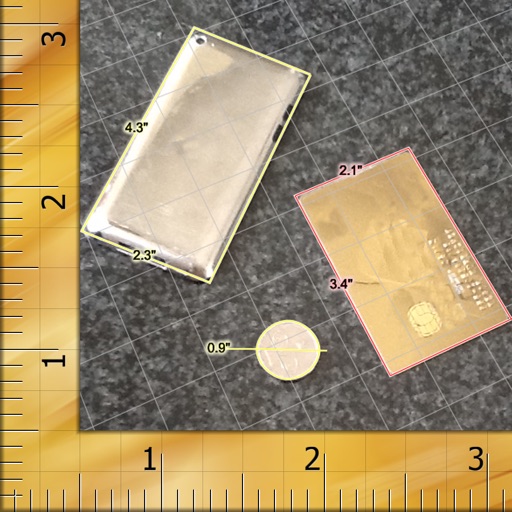
Measure anything from a picture.
The app measures object sizes from pictures. Users can photograph an object next to a reference item, like a credit card, for size calculation.

Zain Ali
Objects from photos and videos
Objects, people, or text from photos and videos. Edit backgrounds realistically without a reference image. Erase pimples, scratches, and telephone wires. Delete power lines and surface imions. Export edited content directly.

新乐 陶
-style shoot with grain effects
Capture photos with a vintage camera style, mimicking Fuji, Hasselblad, and Ricoh colors with visible grain. Retouch images using HSL adjustments, curve controls, defogging, and photo framing tools. Export edited photos directly.

KING JIM CO.,LTD.
Memos with your camera and visualize them
Memos written on compatible boards using the smartphone camera. Select the model to adjust image size. Edit scanned images with write, erase, and add tools. Save and share the final image.

Pocket Bits LLC
Change backgrounds with chroma key.
The app allows users to change a monochromatic background into any image. It offers tools to manually remove backgrounds without a green screen and includes features like auto-enhance, drawing, stickers, text, and various photo effects.


Patrick Wespi
Track points and serve turns
Track scores by tapping boxes to add points and using the undo button to remove them. Switch serving teams with the circle icon and customize team names. Configure automatic side switches in settings.

ZWCAD Software Co.,Ltd.
View, edit, and share DWG files
View and edit DWG, DWF, DXF, and PDF files. Perform precise measurements with 8-digit accuracy. Add annotations and export drawings. Share files and access a large TTF font library. Print drawings directly.


Patel Nishaben
Apply to photos and share them
Edit photos by selecting from the gallery or capturing new ones. Apply various and effects. Adjust image position, size, and angle. Save, share, or upload photos to social media platforms like Facebook, Twitter, and email.

晓鹏 杨
Merge into one long image
Merges into a single image by automatically aligning them. Users can adjust margins manually for custom collages. Screen content can be recorded and saved as a continuous image. Supports webpages, articles, and instructional content.

Falcon In Motion LLC
Read menus in dim light easily.
The app transforms an iPhone or iPad into a lighted magnifying glass. It offers features like crystal clear mode, image stabilization, light level control, and high contrast mode for improved readability.



Hangzhou Xiaoying Innovation Technology Co., Ltd.
Capture spatial photos and videos
Capture spatial photos and videos in 3D on iPhone Xs and later models. Record up to 4K and HDR spatial videos on compatible devices. Use time-lapse mode for dynamic captures. Launch Spatial Camera from the lock screen on iOS 18.

Patel Nishaben
Apply to photos and share them
Edit photos by selecting from the gallery or capturing with the camera. Apply various and effects. Adjust position, size, and angle. Save, share, or upload images to social media platforms like Facebook, Twitter, and email.
Apps are ranked by functional similarity, category fit, rating confidence, and popularity.