Calculate , headwind, and tailwind components for takeoff and landing. Adjust wind speed and direction with drag and pinch gestures. Receive warnings when user-defined wind limits are exceeded.
Calculate -related conversions, fuel consumption, and navigation metrics. Perform arithmetic operations and unit conversions. Track time, distance, and speed. Sync with Apple Watch for real-time updates.
The app collects detailed weather information including wind speed, direction, temperature, and humidity. Users can share these reports instantly through various platforms and online weather services.
The app calculates crosswind, headwind, and tailwind based on runway and wind selection. It provides Canadian Runway Friction Index (CRFI) for safe landings and includes a runway length utility.
Calculate wind components, temperatures, altitudes, and airspeeds. Input runway number, wind direction, and speed. Determine headwind, tailwind, and crosswind values. Adjust for parallel runways based on magnetic heading.
Calculate groundspeed, true heading, compass heading, leg time, distance, fuel required, fuel flow, and endurance for flight planning. Convert airspeed, altitude, and temperature.
FlightWinds calculates crosswind, tailwind, and headwind components for takeoff and landing. Displays dual runway views. Alerts users when wind limits are exceeded. Offers an intuitive interface and universal access.
Calculate pressure and density altitudes, true airspeed, and mach number. Determine wind correction angle and true heading. Compute crosswind, headwind, and tailwind. Find ground speed and flight time. Calculate fuel burn and cloud base.
Navigation provides flight planning and in-flight calculations. Users can customize quick access buttons, configure units, and manage blocks and airtime.
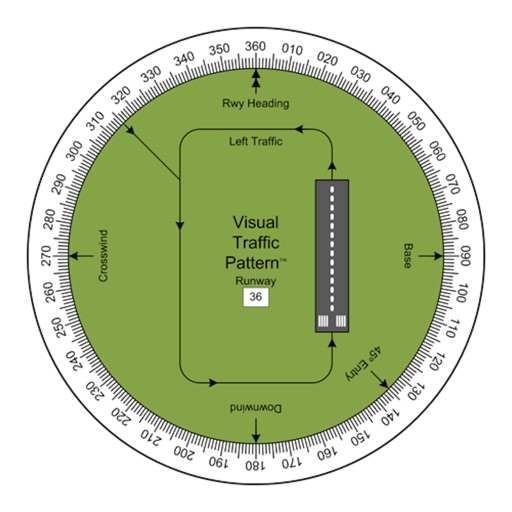
Allows pilots to view runway patterns with finger rotation. Display includes left and right patterns, crosswind, downwind, base, and 45-degree entry headings. Magnetic runway orientation matches aircraft heading for approach visualization.
Navigation provides flight planning and in-flight calculations. Users can customize quick access buttons, configure units, and adjust keypads. Features include real avionics look, flight data entry, and performance calculations.
Calculate performance data for the Diamond using POH values. Interpolate results and adjust parameters with sliders. Display high-resolution graphics for takeoff, climb, and cruise performance.