Manage electrical jobs with time tracking and job invitations. Access NEC calculators for conduit fill, voltage drop, and motor calculations. Use NEC tables for code-compliant installations. View common schematics and generate estimates and invoices.
by Zachary Fisher★ 5.02 ratingsBusinessFreeData updated 2026-09-06
Create and send professional invoices and estimates with customizable templates. Add logos, colors, and signatures. Track receipts and manage billing. Set payment terms and send reminders. Export documents in various formats.
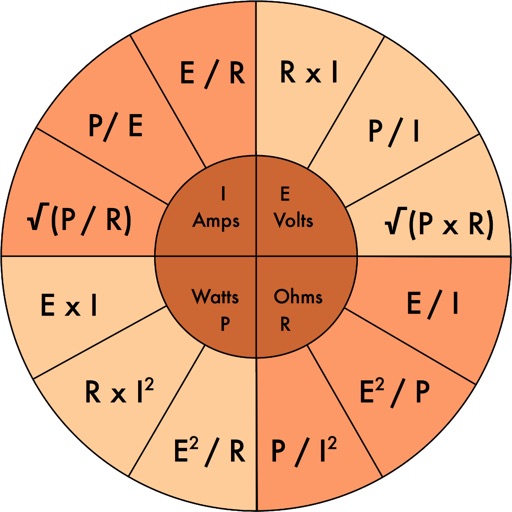
Perform calculations including resistor color code analysis, transformer voltage and current computations, and voltage, current, resistance, and power determinations. Include upgraded voltage drop calculations compliant with NEC/IEEE standards.
Access NEC code sections for electrical installations. Search by topic or keyword. View diagrams and tables. Save and annotate code excerpts. Share references via email or messaging.
The app provides access to over 200,000 home service professionals for various needs, including remodeling, landscaping, and cleaning. It matches users with local professionals and offers ratings, reviews, and price information to help plan projects.
Single Line Diagram helps electrical professionals verify wire and conduit sizes based on load selections. It uses NEC standards to provide minimum requirements. Users can check sizing for designs or installations and validate against code.
Access electrical codes and standards for residential, commercial, and industrial applications. Search for wiring diagrams, safety protocols, and equipment specifications. View detailed explanations of electrical systems and components.
Schedule jobs and send invoices directly from the . Create and share quotes for client approval. Track payments and manage dispatching for teams. Integrate with accounting systems for streamlined billing.
Create and send professional invoices with customizable details including payment info, taxes, and due dates. Track invoices and add extra images. Configure settings for withholding and payment terms. Export and share documents directly.
Manage jobs with digital job cards, track staff locations, and send client emails and texts. Create quotes, log job notes and photos, and handle online bookings. Schedule tasks and manage assets through the .
Manage operations with scheduling, dispatching, and team coordination. Edit schedules from any device, set recurring jobs, assign tasks, and update technicians in real time. Track appointments, send jobs to tech calendars, and manage arrival windows.
For jobs, apply online, and receive alerts for new openings. Save favorite listings, filter by location and industry, and track application status. View company profiles and read reviews from other users.
Create and send professional construction estimates quickly. Manage bids and work orders efficiently. Track project expenses and job details in real time. Generate detailed reports for each project.
Create and send professional invoices and quotes. Track payments and expenses in a centralized dashboard. Set up recurring invoices and receive payments directly through the . Generate business receipts and manage client information.
Create and send itemized estimates with photos for each task. Track job progress and update clients in real time. Manage multiple projects with customizable templates. Generate professional invoices and track payments.
Calculate bends, mark measurements, track progress
Calculate bends with step-by-step guidance for offset and rolling offset types. Input measurements to determine bend angles and lengths. Include diagrams for visual reference. Export bend data for use in installations.