The app allows users to explore 18 common electronic circuits and see the effect of parameter modifications. Concepts covered include Ohm's law, filters, and operational amplifiers for students.
Design and simulate electronic circuits with components like resistors, capacitors, and transistors. View voltage, current, and signal data in real time. Use oscilloscopes and multimeters for measurement. Adjust and test circuits dynamically.
Monitor CPU model, memory usage, and battery health in real-time. Check device specifications, storage details, and sensor data. View CPU frequency and RAM usage metrics. Track device performance and system resources without jailbreaking.
Calculates , RPM, final drive ratio, and rollout in inches and millimeters. Stores setups and notes. Allows emailing of data for record keeping. Input pinion and spur sizes for calculations.
Perform calculations including resistor color code analysis, transformer voltage and current computations, and voltage, current, resistance, and power determinations. Include upgraded voltage drop calculations compliant with NEC/IEEE standards.
Calculate electrical power for single phase systems by converting between , , and . Input values to solve for unknowns. Support for three phase calculations including kilowatts, , , and power factor.
Calculate circuits, convert units, test experiments
Solve electrical problems by calculating voltage, current, and resistance. Input values to determine unknown variables. Perform unit conversions and conduct experiments. Store and retrieve calculation results.
The app allows users to control the PowerDrive Bluetooth inverter using an iPhone. It displays battery voltage, output power, and product temperature, and enables remote setup of protection alarms for voltage, overload, and temperature.
The app allows real-time parameter adjustments for DJI A2 Flight Controller Systems and DJI Ronin and Ronin-M. It supports Bluetooth 4.0 and displays real-time flight data.
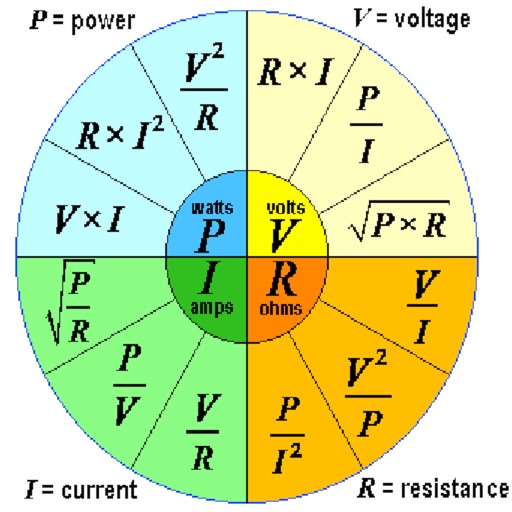
Calculate voltage, current, resistance, or electric power by entering any two values. Convert results between normal and scientific notation. Display calculated values clearly.
The app allows users to design, build, and test DC circuits on their iPhone or iPad. It visually demonstrates charge flow and displays voltages on circuit nodes, with bulbs glowing based on power dissipation.
Simulate electronic circuits with engine and virtual instruments. Add components to a breadboard and connect them. Analyze signals using oscilloscope and logic analyzer. Export simulation data. Create or customize electronic parts.
The app allows users to design, simulate, and learn analog and digital electronics. Its simulation engine provides real-time analysis, enabling users to interact with powered circuits and observe results instantly.