Take notes anywhere with floating popup functionality. Sync notes across Apple devices using iCloud. Support for Mac, iPhone, iPad, and Apple Watch. Access 4 vintage pixel art themes with 3 pixel fonts. Use prompter mode for video recordings.
by editoy Inc.★ 0.00 ratingsProductivity$2.99Data updated 2026-09-06
Record voice or video and convert to text in real time or from files. interviews, lectures, and meetings. Organize notes with folders and search functionality. Export text as PDF or text file. Sync across devices.
Manage with a minimalist todo and calendar integration. Add notes with customizable themes. Backup and restore data via iCloud. Set notifications and use a widget for quick access. Supports landscape mode on iPads.
Create structured with multi-level document management and color tags for quick highlights. Add password protection for secure notes. Sync across Mac, iPhone, and iPad using iCloud. Share documents and use intuitive gestures for editing.
Store notes, passwords, and reminders with biometric or passcode protection. Encrypt data for security. Sync notes across iOS devices via iCloud. Add text, images, and organize entries in a minimalist interface.
The app allows users to create typed notes with integrated voice recordings and photos. Notes are color-coded for organization and can have reminders set.
Customizable video with floating window, playback speed control, picture-in-picture, DLNA and AirPlay casting, and one-click screen lock. Supports JavaScript and Tampermonkey 5.3.0 scripts for enhanced compatibility.
Secure real-time translation between languages. Control audio recordings with start, stop, and playback functions. Generate music using AI-based composition tools. Share audio content within a community platform.
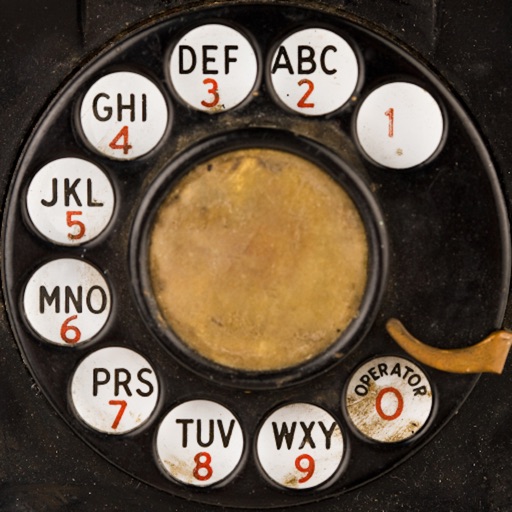
Dial numbers using physical buttons and sound effects. Set volume for sound effects and enable touch tone for faster dialing. Make calls without a touchscreen. Memorize numbers by heart. Pause to think before dialing. Relive vintage phone experience.
Turns iPad or iPhone into a second for Mac via USB. Browse documents or watch videos with low latency. Use pinch-to-zoom on Mac. Enable Split View for multitasking. Supports touch gestures for enhanced control.
Text editing with live Markdown syntax highlighting and HTML preview. Sync across iPad, iPhone, and Mac via iCloud. Use typewriter mode for focused writing. Track word, symbol, and sentence counts. Support tags and document browsing.
Convert spoken words into text in real time using advanced speech recognition. Dictate emails, notes, and documents without typing. Edit transcriptions directly. Export text to various formats and share via email or messaging.
Create documents, manage , organize knowledge, chat
Create structured documents, manage , and organize knowledge with Collections. Chat using AI Assistant. Sync across iPhone, iPad, Mac, and web. Work offline with full functionality.
Record audio in MP3, WAV, and M4A formats. Convert to text for notes and transcripts. Manage memos with file organization and playback. Sync with Apple Watch for hands-free recording. Share recordings directly from the .
Create and organize notes with customizable fonts. Attach images or documents to notes. Sync notes and files across devices including PCs and iPads. Restore notes and files after device reformatting. Share notes via email or cloud services.
Track the number of or treaters visiting your house and compete with friends in real time. Sync counts across devices using iCloud and share updates with friends. View real-time friend counts in the sharing tab.
Take notes during gameplay with 90 FPS and 120 FPS support. Capture screenshots and screen recordings. Share notes and recordings directly. Sync notes across devices.
Track daily emotions with built-in mood charts and journal entries. Set reminders for journaling. Access writing prompts for inspiration. Sync journal data securely via iCloud. Encrypt all entries to protect privacy.
The app allows users to create typed notes with integrated voice recordings and photos. Notes are color-coded for organization and can have reminders set.
Organize notes in folders and add pictures. Check items as complete with due dates and reminders. Search notes and filter by tags or calendar dates. Sync across iOS devices and view notes on web. Share folders with others and use journal mode.
High-quality audio for case notes, interviews, or field research. using AI or order human transcripts with 99% accuracy. Edit, highlight, and collaborate on transcripts. Sync across devices and use AI templates for analysis.