The app plays back audio files, allowing users to alter playback speed and pitch independently while maintaining audio quality. Its interface is designed for keyboard control, enabling musicians to practice with an instrument in hand.
by HEINZ GOETZ★ 0.00 ratingsMusic$5.99Data updated 2026-10-07
The app allows users to adjust the tempo of songs from Apple Music, their Music app, or the Files app. Users can select any tempo between -50% and +100% and loop specific song sections for practice.
Detects BPM of any audio using the device's microphone. Displays real-time calculations without user input. Ideal for DJs, musicians, and dancers needing accurate beat tracking.
Practice rhythms and compose music with customizable patterns and notation. Track practice sessions and set goals. Schedule rehearsals and manage setlists. Export and print sheet music. Collaborate with other musicians in real time.
Play tabla, tanpura, and manjira sounds for Indian classical practice. Adjust tempo and pitch. Record and playback performances. Access sheet and tablature. Sync with practice sessions and lessons. Track progress and refine techniques.
Play music, customize playlists, and control playback
Play music files in multiple formats including , APE, and MP3. Customize 3D and normal sound effects. Queue and manage sound effects. View and control lyrics. Share custom sound effects. Control playback with a customizable interface.
Create musical compositions using numbered notation with support for various rhythms and pitches. Input lyrics and accidentals, and adjust key signatures and tempo. Play back notation with sound, select sections for playback, and set instruments.
Learn notes and chords through interactive . Identify key signatures for major and minor scales. Guess notes on treble and bass clefs. Play competitive to practice guitar and piano chords using a MIDI keyboard.
Create and edit songs by dragging and dropping chords. Transpose songs to any key. Generate print-ready PDFs. Analyze and display fingerings for chords, scales, and arpeggios.
The app generates sound by mixing two oscillators with selectable waveforms. Users can create sounds using arpeggiators, sequencers, and various synthesis methods.
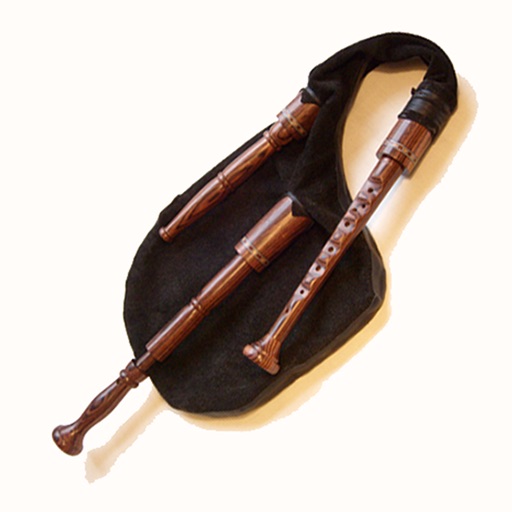
The app provides an authentic sounding Swedish bagpipe with a single chanter and drone. It can be played on-screen or with a hardware MIDI chanter or keyboard, and it supports MIDI pitch bend and chromatic to GHB scale mapping.
Analyze real-time audio for musical scale, , octave, frequency, and waveform. Measure vocal range and detect Do, Re, Mi. Practice accuracy and tune instruments. Pause analysis to review results. Display waveform and frequency data for voice training.
Record up to 16 tracks with effects like pan, reverse, reverb, tremolo, and tempo delay. Use as a standalone or plugin. Manage master and input effects. Loop and layer audio for creative playback.
Mix audio tracks using automatic BPM detection and tap to adjust BPM. Apply over 20 DJ effects and automated audio FX. Access tracks from iTunes and cloud sources. Integrate with hardware for remixing.
Allows users to create and customize drum patterns using 16 drum pads. Each pad can trigger individual sounds or loops. Users can load custom samples or drum loops and have them sliced automatically.
Control instruments, mix audio, and manage effects
Control multiple MIDI instruments and hardware devices through organized sections. Adjust sound parameters and switch sounds within each section. Host AUv3 plugins and manage audio routing for keyboard players.