The app notifies if the RF11iQ product has been damaged by a power surge, identifying the affected circuit. It allows control of circuits, including turning them On/Off or rebooting, and can be set up to save standby power.
by Thor Technologies Pty Ltd★ 0.00 ratingsUtilitiesFreeData updated 2026-09-30
Design circuits, simulate logic, test configurations
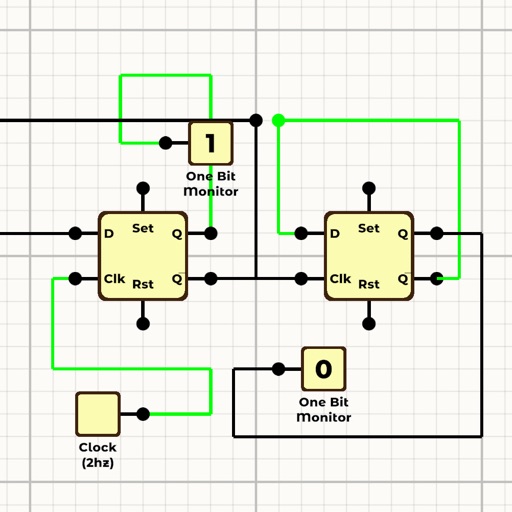
Design and simulate logic circuits with drag-and-drop components. Connect inputs and outputs to test behavior. View real-time simulation results and adjust parameters dynamically. Save and export designs for further analysis.
Calculate tank volume for cylindrical or rectangular tanks with flat, dished, spherical, or conical top and bottom styles. Input parameters to determine volume. Share results via email. View product information in a browser.
Calculate values using Ohm’s Law with inputs for voltage, current, and resistance. Determine power with formulas for watts, amps, and volts. Convert between units like volts, amps, and kilowatts. Store frequently used values for quick access.
Report local issues like potholes, graffiti, and damaged trees by submitting service requests. Track city responses and provide precise locations via GPS. Submit photos and descriptions for each issue. Receive updates on repair progress.
Explore with high-quality audio playback and detailed sound visualization. Adjust settings and customize playback queues. Access artist discographies and track lyrics. Share songs via social media or messaging apps.
Report local issues like street maintenance, garbage, potholes, and damaged signs. Upload photos and videos. Select from predefined problem categories. Use GPS to locate issues. Submit reports with location data. Track report status.
AV receivers via Mac with power management, volume adjustment, source selection, and playback controls. Toggle mute, navigate tracks, and adjust tuning settings. Customize shortcuts for quick access. Requires local network connection to the receiver.
TV volume, channels, and power with touch gestures. Navigate menus, access apps, and search content. Compatible with multiple Smart TV models. Perform basic functions without physical hardware.
Monitor battery voltage, output power, and product temperature. Set protection alarms for under voltage, over voltage, overload, and over-temperature. Adjust settings and perform battery tests remotely.
The app provides directors and staff members access to competition commentary files. It delivers in-app notifications from user circuits for updates and announcements.
Residents can submit requests for city issues like property maintenance, damaged signs, and potholes. Upload photos or videos with GPS location. Track request status until resolution. Report problems directly through the .
Manage network projects by creating, editing, and configuring devices. Set up WiFi, monitor network status and topology. Track alarms and view device details.
Control connected devices like ArfPets Automatic WiFi Pet Feeder, Dehumidifier, and Wine Cooler. Turn devices on or off, set timers, and schedule feedings. Create home scenes and share access with others.