The app offers intuitive UI design for fast electronic invoice scanning and input. It supports manual and automatic invoice detail retrieval, common carrier registration, and manual traditional invoice entry.
by KANG JIA-HAUR★ 0.00 ratingsLifestyleFreeData updated 2026-09-26
Set tempo using microphone or manual input. Create and save presets with custom settings. Build unlimited playlists and print them. Sync presets across devices via iCloud. Use built-in tuner and upload custom sounds.
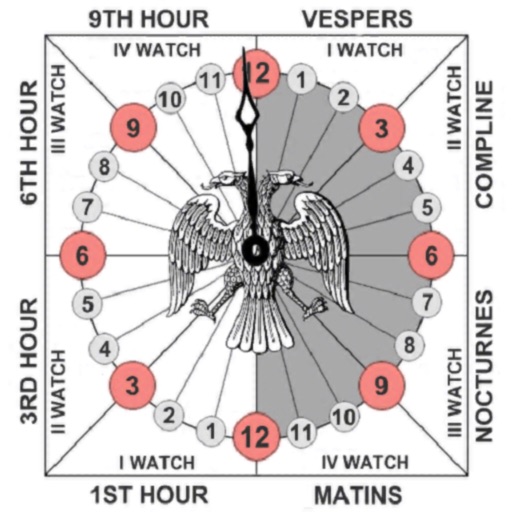
Track prayer times based on time calculations. Adjust for location using GPS or manual input of coordinates. Display times in 12-hour format starting at evening. Include historical context about ancient Judean timekeeping methods.
The app combines mobile device GPS with handheld mapping to plot bearings and determine Crosspoints. It simplifies the tracking process by eliminating manual map handling and plotting intersection points.
The app offers manual and automatic modes for adjusting shutter speed and exposure. It includes a light trail mode for creative effects and a self-timer for capturing shots.
Use Bluetooth to unlock devices. Follow user manual instructions to check compatibility with access readers. Operate offline without internet connection.
Control WiFi thermostat settings remotely. Adjust temperature, set schedules, and view real-time energy usage. Receive notifications for system status and manual override options.
Documents and save as PDF in a selected folder. Single tap to start scanning. Automatically detects and crops documents, fixes skew, and names files with timestamps. Uploads to without manual selection.
Track and manage game scores without manual entry. Customize team names, add and adjust bonus points, set winning scores, and delete last entries. Scores are saved automatically even when the is closed.
The app monitors the performance of websites, web services, personal servers, or home networks concurrently. It provides up-to-date information in real-time without requiring manual refreshes.
Scan QR codes and barcodes instantly using automatic or manual capture. Create custom QR codes by selecting data type and design. Check URL safety before opening links. Share scanned content via email, messaging, or social media.
Scan QR codes or barcodes by pointing the camera at them. Automatically detect and recognize codes without manual input. nd share QR codes for links or contact information. Access event tickets or product details instantly through scanned codes.
Control IoT devices remotely with manual and voice commands. Monitor device status and set automated routines for smart execution. Manage connected devices and trigger actions based on predefined conditions.
QR scanner application reads and displays QR codes instantly through the camera. It opens linked web pages automatically. It shows text or phone numbers from plain QR codes. No manual clicks are required for scanning.
Access real-time performance data, update vehicle status and location, and view condition reports. Connect to the car for owner’s manual access and remote diagnostics. Track maintenance alerts and system diagnostics.
"Tracks in focused work sessions with screen blinking alerts. Offers customizable intervals and break durations. Includes a distraction-free mode with no sounds. Syncs across devices and allows manual session logging."
Configure proxy connections with support for SS, SSR, VMESS, VLESS, Trojan, HTTP/S, Hysteria2, and more. Import subscriptions via QR code, URL, or manual entry. Set custom DNS settings and test connection latency.
Track with manual or automatic time calculation. Manage multiple clients with custom hourly rates. Capture photo evidence of and payments. View productivity reports and export time logs.
Monitor drone performance by analyzing system logs and identifying potential issues. Upload DJI GO log files directly from mobile devices to .com without manual file transfer. logs automatically for detailed flight data review.
Run apps directly on iOS devices without manual builds or installations. Use hot reloading to see real-time code changes. Explore interfaces and test functionality on actual devices.