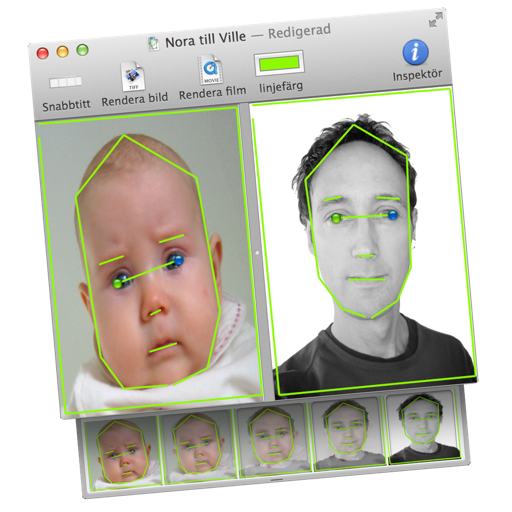
Transform images or videos by dragging two images into the document. Define similar areas with lines to create morphed transitions. Save results as still images or animated QuickTime movies.
by Martin Wennerberg★ 0.00 ratingsPhoto & VideoFreeData updated 2026-09-06
Create AI-generated videos from text or images using Google's Veo 3 and Veo 2 models. Input text prompts to generate cinematic videos with realistic visuals, physics, and sound effects. Edit length and export in various formats.
Edit photos by selecting from Camera Roll or taking new shots. Apply real-time effects to create prism-like glass pieces. Adjust frames, shapes, and patterns. Rotate, resize, and drag elements for custom designs. Export and share edited images.
Together vertically or horizontally. Combine chats, web pages, or side-by-side images into one image. Redact private information before sharing. Save and share the combined image directly.
Create AI-powered videos from text or images. Generate cinematic movies, visual effects, and dynamic visuals with minimal effort. Edit and export videos directly within the .
Remove from images using AI-powered cutout. Select between "Star" mode for edge detection or "Auto" mode for pixel-based erasing. Save transparent images for use as stickers in other apps.
Take time-lapse photos with adjustable interval settings. Create movies from captured images. Store photos directly in the . Export videos in sideways orientation. Adjust settings for photo and video capture.
APPNATION YAZILIM HIZMETLERI TICARET ANONIM SIRKETI
Edit photos, enhance videos, share creations
AI Headshot Excellence: Create flawless, studio-quality portraits with automated retouching and background blur. Edit photos with advanced filters, cropping, and exposure adjustments. Add text, stickers, and effects.
Convert static images into dynamic videos using generative AI. Add text to images for visual storytelling. Apply trending AI presets to enhance creativity. Edit and export videos directly from the .
View and browse high-resolution art . Pull down to load more images. Save to photo gallery. Share via Facebook, Twitter, and Google+. Requires internet connection for image loading.
Create custom grids over reference images or drawing surfaces. Set grid dimensions and adjust spacing. Transfer intricate details square by square. Export drawings in multiple formats. Share directly from the .
Add , reindeer, sleighs, and Christmas trees to photos. Apply high-quality filter masks. Share edited images on social media or via email. Edit and customize holiday photos with multiple overlays.
Edit photos with AI-powered filters, morphing, and style transfer. Create anime characters, cartoon avatars, or professional portraits. Transform photos into videos with AI animations, pet interactions, or dramatic effects.
Scan film negatives using AI to reveal hidden images. Automatically capture and process negatives with a backlight source. Adjust exposure and color balance. Export scanned images in high resolution. Share directly or save to cloud storage.
Edit photos by applying AI-generated filters and effects. Choose from various styles and presets. Process images automatically for polished results. Share edited photos directly.
Convert video files to QuickTime formats including H.264 and ProRes. Supports AVCHD, MTS, m2ts, and Blu-ray conversion. Edit timelines with in and out points. Convert single files or use batch processing for multiple movies.
Create AI-generated videos and images with single-click tools. Apply special effects to photos and convert them into effects. Use AI Dance and AI Avatar features to animate images and generate motion graphics.
Edit videos and images with transitions, filters, and sound effects. Add text, stickers, and multi-music tracks. Apply beautification effects and customize music clips. Export and share finished videos.