Organize notes with tags and password protection. Create calendar events and reminders from notes. Adjust text size and font. Export notes as PDF via email or to Dropbox and other apps. Set restore points for backups.
by Zymbiotic Technologies★ 2.01 ratingsProductivity$0.99Data updated 2026-09-08
Convert audio and video content into written notes with speech-to-text transcription. Create quizzes and flashcards from notes. Organize content into structured notes with AI assistance. Export notes in multiple formats.
Record and convert audio to text using speech recognition. Capture notes from videos or audio files. Summarize content with AI to extract key points. Organize notes into folders and tag them for easy retrieval.
Organize and manage research papers with automatic PDF import and citation formatting. Create and annotate bibliographies. Export references in multiple citation styles. Sync notes and highlights across devices.
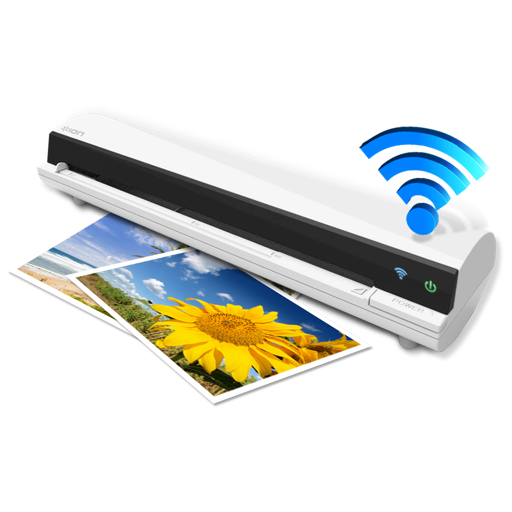
The app works with the ION Air Copy hardware, a portable Wi-Fi scanner. It scans photos, receipts, business cards, notes, and documents up to US Legal size directly to a Mac, then shares them via email or social networking.
Scan documents, notes, and images to create PDFs. Merge multiple PDFs into one. Compress files to reduce size. Split large PDFs into smaller sections. Share and store PDFs efficiently.
The app offers customizable notes with options for background, font, and text color. Users can pin notes to the desktop, make them translucent, and create new notes by dragging content to the menu bar icon.
Digitize and manage documents with advanced scanning tools. Convert papers to PDF, edit text, add annotations, and organize files. Share documents securely and access them across devices.
Record audio during meetings or lectures. Convert speech to text in real time. Generate smart summaries of content. Organize with AI-powered categorization. Edit and share transcribed text directly.
Manage jobs by updating statuses and tracking notes. Upload documents and view current schedules. job details and communicate with team members through the platform.
Write notes by hand with a simple interface. Tap to access color selection and storage. Use multiple fingers for smooth writing. Choose from five colors: black, red, blue, green, and pink. Adjust line thickness with a slider.
Access event sessions, speakers, and exhibitors. Personalize your schedule, take notes, and download materials. Sync with your calendar and receive real-time updates.
Secure and calendar allows users to create and manage private entries with Face ID or PIN protection. Set reminders, organize notes by date, and sync with calendar. View daily entries and track recurring events.
The app protects and organizes personal data, business notes, and important web addresses. Users can attach files to notes, support all file types, and protect sensitive information like bank transactions and passport scans.
Create and edit musical scores using handwriting input. Render notes into professional notation and playback. Adjust note pitch and duration by dragging. Use split screen and dark mode. Access 128 General MIDI instruments and unlimited tracks.