Apps Like Diapason Audio Generator for iPhone and iPad
Generate test tones with multiple sources.
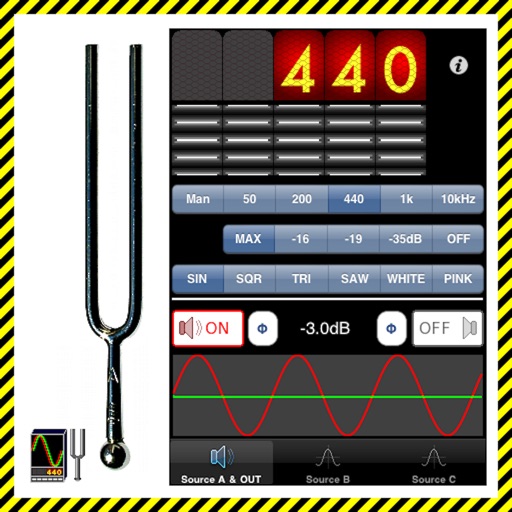
The app generates test tones including sine, square, triangle, sawtooth waves, and noise. Users can combine up to four independent sources with phase switching for each channel.
by Fabien Lefebvre★ 5.01 ratingsUtilities$1.99Data updated 2026-09-13
Udio signals with adjustable parameters and frequency up to 20 kHz. Create single signals, sweeps, or merged signals. Control duty cycle, frequency, and waveform type. Export generated audio files.
Use optimized sound frequencies to clean phone speakers and remove buildup. Initiate one-tap mode for instant cleaning. Test performance before and after cleaning. Monitor noise levels with a decibel meter. Adjust volume safely for iPhone speakers.
Adjust audio settings with a customizable equalizer. Boost volume and enhance bass for louder playback. to Bluetooth devices and wired . Improve speaker sound quality with audio enhancement features.
Test phone speakers with tones ranging from 0 Hz to 25 kHz. Use manual or automatic mode to assess performance. Perform stereo tests to evaluate sound quality. Clean speakers by generating frequencies to remove dust and buildup.
Real-time analysis displays waveform and amplitude simultaneously. Users can switch between portrait and landscape modes. Options to configure waveform and display. Adjustable FFT size and window function for precise frequency analysis.
Control LED brightness and use built-in screen or LED for lighting. Access different light modes for stroboscope, graffiti, and SOS. Enable fullscreen mode without interface elements. Use Siri Shortcuts and quick home screen actions. Customize icon.
Provides precise tuning for various instruments including guitar, violin, piano, and flute. It detects pitch and displays frequency. Users can adjust tuning settings and save custom presets.
Maintain device sound quality with , tone generation, and noise monitoring. Play frequencies to remove from speakers. Generate precise audio tones for testing or sound experiments. Measure ambient noise levels accurately.
Generate based on selected base frequencies and wave types. Choose frequencies between 1 to 50 Hz and base frequencies from 20 to 1500 Hz. Supports Alpha, Beta, Delta, Gamma, Mu, and Theta waves.
Measure audio, adjust equalizers, set subwoofer phase
Perform room correction by measuring with sine sweeps or real-time pink noise. Average measurements or use moving mic measurements. Compare results to target curves and edit them. Generate equalization filters for PEQ or FIR.
Udio signals for up to 16 channels. Choose from four wave types: sine, triangle, square, and saw. Adjust volume per channel. View and summarize waveform settings at the bottom of the screen.
The app offers precise tuning for a wide range of instruments, including guitar, violin, and piano. It features a chromatic tuner, tone generator, and adjustable settings for latency and A4 frequency.
Test speaker audio output using frequency ranges to assess clarity and balance. Perform stereo checks to ensure equal left and right channel performance. Generate tones within 160–180 Hz to adjust and optimize sound quality.
Separate vocals and instruments using AI. Edit in videos with volume adjustments and effects. Convert between multiple formats. Apply over 20 effects. Record with built-in effects.
Allows users to evaluate performance through frequency sweep analysis and high amplitude sound wave testing. Identify distortion and response issues. nd play custom audio for detailed acoustic assessment.