Create interactive web projects using JavaScript and Native code. Connect iOS device to computer for development. Use Capacitor 7 for cross-platform capabilities. Implement gesture controls and graphical elements.
by digital shift ou★ 4.52 ratingsDeveloper ToolsFreeData updated 2026-09-06
Access computers and mobile devices remotely with cross-platform support. Control devices with touch gestures and multi-monitor support. Reboot or shut down devices remotely. Transmit sound in real-time. Use AES-256 encryption for secure connections.
Create 3D poses by rotating, zooming, and cloning an interactive . Use presets to generate poses quickly. Design scenes with multiple characters. Generate images based on custom poses with realistic style options.
Create and manage issues and checklists on an iPad. Capture photos and notes during site visits. Share updates in real time with project teams. Access 2D and 3D models for verification.
Edit in real-time with live output preview. Tap elements to view and modify their . Update changes instantly. Create , CSS, and JavaScript projects. Export for further use.
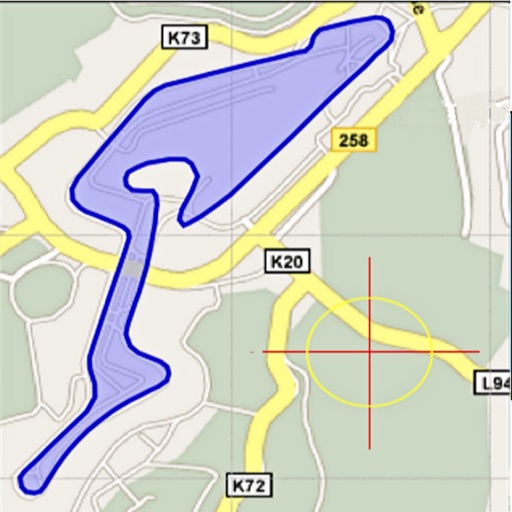
Area, lengths, and angles on maps using an interactive crosshair. Trace outlines to create connected points, updating area and perimeter in real time. Adjust radius for scaling features. View dynamic length and angle as you move the crosshair.
The app simplifies photo management with swipe, drag, and flick gestures for fast deletion. It helps users remove unwanted pictures, screenshots, and duplicates to free up device memory.
Provides a development environment for web designers and developers. It includes live preview and reload for real-time code changes. It supports HTML, CSS, and JavaScript with auto-completion. It also handles LESS, SCSS, and CoffeeScript.
Helps users calculate electrical values using Ohm's Law. It includes practical exercises and theoretical explanations. Users can explore basic electrical concepts and advanced topics with structured lessons and problem-solving tools.
Manage website development projects with task tracking, progress updates, and file sharing. Create and monitor support tickets. Chat in real time for immediate assistance. View project timelines and deadlines.
Allows users to interact with AI via real-time responses and supports latest chat models. It includes a code interpreter plugin and markdown syntax highlighting. The provides native performance without loading or refreshing.
Organize with hierarchical tags and bidirectional links to connect related ideas. Create and reference dynamically, enabling seamless navigation between linked content. Manage knowledge through structured tagging and intuitive note linking.
Create notes in various formats including text, documents, and image sets. Organize notes into Projects for custom sorting. Lock sensitive notes with authentication to restrict access and hide them from search.
The app displays the HTML, CSS, and Javascript source code for any website. It highlights code elements and extracts embedded links and images for viewing and saving.