Solve and track Rubik's Cube puzzles with unlimited sessions. Swipe through pages and select from 11 scramble types including 3x3 scramble images. Apply themes, calculate averages instantly, and log +2 and DNF penalties.
by Ethan Baumgartner★ 4.760 ratingsUtilitiesFreeData updated 2026-09-06
Change icons on the home screen with customizable styles. Select from over 100 icons and adjust shape, color, and background. Install modified icons to personalize the device interface.
Create and edit PDFs by scanning documents, combining files, or importing images. Add pages, delete or reorder content, and apply markup. Export with password protection and extract pages or images.
FP performs basic arithmetic, currency conversions, and unit conversions. Users can switch between dark and light modes. Split-screen mode is available on iPad.
Perform basic and calculations including trigonometric and inverse trigonometric functions. Use mathematical functions like absolute value, ceiling, floor, and rounding. Modify calculations in real time by clicking steps.
Allows users to start and stop timing by placing fingers on left and right pads. It displays red and green lights to indicate readiness. Users can reset the and view elapsed time during sessions.
Track progress with manual, automatic, and breathing-focused modes. Use audio guidance and customize texts. Join live sessions for real-time participation. Sync with global communities for shared experiences.
Calculate with a dual-line display showing input and result simultaneously. Use percentage and backspace functions. Choose from 18 color themes. Enter multi-line equations. Automatically format scientific expressions. Access via Split View.
Customize appearance with themes, wallpapers, and fonts. Choose from 20+ themes and over 1000 emojis. Set personal photos as backgrounds. Adjust key shapes and font styles for typing.
Customize incoming screens with a variety of themes and patterns. Choose from multiple pre-designed options or create custom themes. Apply selected themes to personalize appearances. Share or save created themes for future use.
Create for tasks like cooking, studying, or workouts with custom settings. Manage timer pages to organize and access quickly. Start, pause, and resume with a single tap. Track time without ads or distractions.
Track initiative, health, and conditions for characters and monsters. Manage experience points and apply status effects. Generate random encounters and calculate difficulty levels. Access a iary, spell list, and magic items.
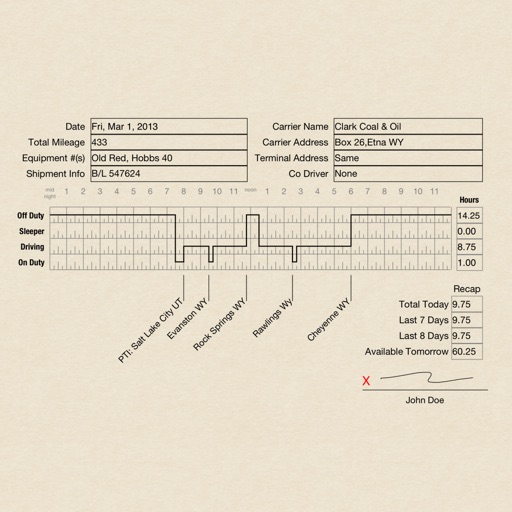
Create RODS for duty status records, sign and email them. Track driving hours, log activities, and print records. Manage logs with pages that require purchase after the first 30.
Customize appearance with LED lighting effects and themes. Choose from various backlit options and color schemes. Access over 7000 Emojis, WhatsApp Stickers, GIFs, and TikTok Emojis. Apply cool fonts and adjust layout settings.
Browse the web with a clean, minimal interface. Customize settings and themes. Block ads and trackers. Manage bookmarks and history. Open links in private mode. Share pages via email or social media.
Calculate sales tax and discounts with percentage-based equations. View calculation history for reuse. Adjust tax settings via swipe. Customize rounding preferences. Choose from multiple color themes. Perform basic arithmetic operations.
Customize keyboard appearance with themes, fonts, and design elements. Choose from pre-made or create custom layouts. Adjust colors, patterns, and visual effects. Apply changes instantly to the on-screen keyboard.
Print documents and photos by selecting files from Camera Roll, web pages, emails, attachments, or Clipboard. Customize print settings and choose specific contacts or the full contact list. Support over 30 file types including PDF, DOC, XLS, and PPT.
Customize keyboard appearance with user photos as backgrounds. Choose from 1000+ themes, 100+ fonts, and endless wallpapers. Add key tap sounds, GIFs, and emoji keyboards. Enable fun effects and artistic fonts for typing.