Test with syntax highlighting and match visualization. Customize highlight colors and view results in a list. Perform replacements and choose from light or dark themes. Access a cheatsheet for operators and metacharacters.
Allows users to study Microsoft fundamentals, role-based, and expert-level topics. Access interactive lessons, practice exams, and certification preparation materials. Track progress and receive feedback on performance.
Simulate electronic circuits with engine and virtual instruments. Add components to a breadboard and connect them. Analyze signals using oscilloscope and logic analyzer. Export simulation data. Create or customize electronic parts.
Inspect web pages with built-in DevTools to view source code, static resources, API requests, cookies, and storage. Change User-Agent to test across devices and browsers. Inject custom JavaScript to modify pages or simulate environments.
Arthur Eduardo Skaetta Alvarez Desenvolvimento de Software LTDA.
NFC tags and edit data
NFC tags by tapping your device against them and view detailed content reports. Modify tags by erasing, locking, or copying data. to tags in multiple formats without needing external hardware.
Teaches Xcode features and Swift through interactive . Covers core concepts and advanced techniques. Includes step-by-step guidance and practical examples. Allows users to practice coding directly within the .
Write and edit Python code with syntax highlighting, auto-indentation, and code completion. Compile and run scripts directly on the device. Access a library of tutorials and examples for learning or reference.
Study for the AWS Associate with 1,200 practice questions organized into structured tests. Answer each question and receive instant explanations. Identify weak areas and track progress through detailed feedback.
Input domains or IP addresses to check TLS security. Inspect websites directly from a browser extension. View trust status and certificate details. Identify security issues and device trust relationships.
Write Python code on mobile devices with syntax highlighting and error stack support. Run scripts directly. Use split screen for code and console. Access built-in environment for development.
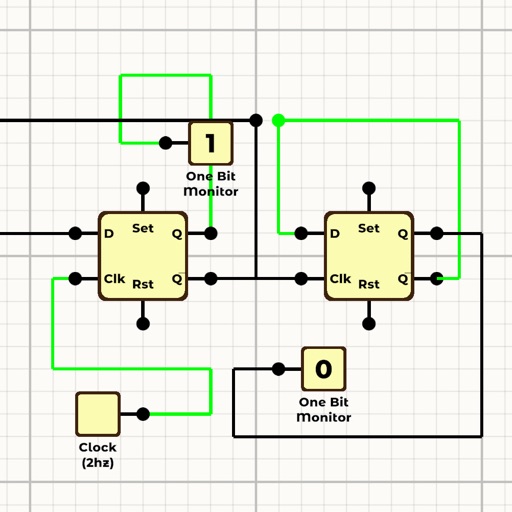
Design circuits, simulate logic, test configurations
Design and simulate logic circuits with drag-and-drop components. Connect inputs and outputs to test behavior. View real-time simulation results and adjust parameters dynamically. Save and export designs for further analysis.
Monitor activity to identify apps connecting to the internet. View detailed reports showing which apps are active, their data usage, and background requests. Check for privacy risks and track data consumption without technical expertise.