
PopArt FX
Sebastien BUET
Create Pop Art photo gallery effects.
The app allows users to create color patterns and apply them to photos. Users can define custom patterns by adjusting colors for gray levels or modify existing ones.

Edit photos and suggest background colors
Edit photos by applying recommended background colors and color combinations. Adjust color schemes with two fingers. Blur backgrounds and select from multiple color options. Access photos from the album and make edits directly.
Showing 541–560 of 1,000 ranked alternatives.
Sebastien BUET
Create Pop Art photo gallery effects.
The app allows users to create color patterns and apply them to photos. Users can define custom patterns by adjusting colors for gray levels or modify existing ones.
Mireia Lluch Ortola
Create with photos in flower and nature
Create greeting by placing photos in flower and nature . Select from various pre-designed or use your mobile gallery or camera. Adjust photos with zoom, rotate, and move gestures. Save and share through social networking apps.

JellyBus Inc.
Capture and print film-like photos
Capture photos with an analog 35mm film camera effect. Apply chromatic aberration, film grain, and color fading. Export images with simulated print quality. Share edited photos directly.
Andrei Kuzmenko
Frame photos and share with friends
Decorate photos with over 200 frames and color effects. Apply bokeh effects and stickers. Share edited photos directly with friends.

Lightsphere LLC
Add holiday to photos
Edit photos by adding Christmas with 30 options and 20 Halloween mini . Choose between solid or flashing effects. Use 9 holiday or 3 spooky backgrounds. Save edited images to the 's album, camera roll, or share directly.

华 刘
Edit photos with artistic effects
Edit photos with 400+ artistic filters and effects. Apply oil painting, graffiti, sketch, and pop art styles. Adjust colors and textures. Save and share edited images directly.

惠满 贺
Edit photos with , focus, and color
Edit photos with filters, adjustments, and effects. and focus areas with finger movements. Crop, rotate, and add text or stickers. Adjust tone curves and apply splash effects. Save and share edited photos to social media.
Katsushi Nakano
Create original button badge designs easily.
The app allows users to design original button badges, round logos, and round stickers on an iPad. Users can select from various badge sizes, fonts, and stamps, and use photos as backgrounds.

COUNTDN AI Corp.
Edit photos, enhance images, remove backgrounds
Edit photos with AI-powered tools like Magic Eraser and AI Background Changer. Remove unwanted elements, generate images, and enhance photos without manual adjustments. Create studio-quality edits and share directly.

Benjamin Lambinet
Apply filters with cinematic color styles
Apply filters inspired by real color film prints to photos and videos. Adjust colors pixel by pixel for realistic results. Save images in high resolution without quality loss. Compatible with editing software like Premiere Pro and Photoshop.

Bhuvan Gupta
Edit photos with light effects
Edit photos with light filters, including circle, frame, star, heart, glasses, and lines. Add text with customizable vector graphics. Apply coloring and create templates for creative artwork. Export edited images directly.
Mireia Lluch Ortola
Place photos in to create
Create greeting by selecting and photos from your gallery or camera. Adjust photos with zoom, rotate, and move gestures. Save and share through social media apps.

Khuong Pham
Edit text in images and draw freely
Edit screenshots by selecting and redacting text, highlighting key details, adding strikethroughs, and drawing freehand annotations. Adjust text appearance with styling options and export edited images.

Arthur Eduardo Skaetta Alvarez Desenvolvimento de Software LTDA.
Blur backgrounds, enhance portraits
Edit photos with blur and AI-powered segmentation to isolate subjects. Apply multiple blur effects and adjust settings for precise results. Export edited images in various formats and share directly.
海文 王
Convert photos into pencil sketches.
The app converts photos to pencil sketches. Users can select photos from their album or take new ones with the camera.
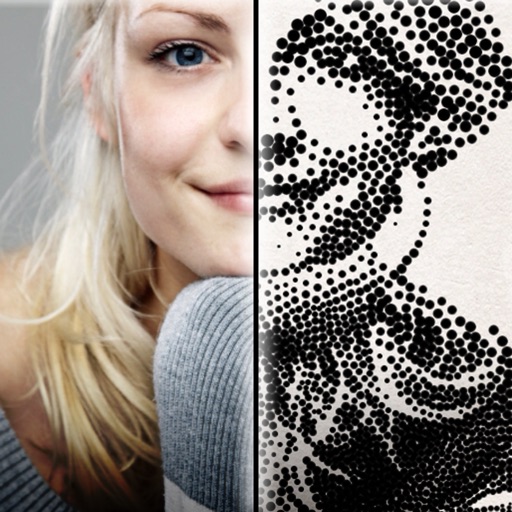
Dotwerx LLC
Create professional stipple drawings from photos.
The app creates customized professional stipple drawings from photos using easy editing tools. Users can adjust contrast, brightness, and the number of dots to transform photos into unique works of art.

Apps are ranked by functional similarity, category fit, rating confidence, and popularity.