Play a tenpin game with a swipe-to-throw mechanic that simulates real physics. Test different balls and lanes in practice mode. Adjust bumper settings for gameplay. Compete against other players or practice alone.
Solves linear and quadratic equations with step-by-step explanations. Handles inequalities and systems of equations. Graphs equations and factors quadratics. Evaluates expressions and follows order of operations.
Calculate loads, voltage drops, and conductor sizes according to NEC codes. Verify compliance for residential and commercial projects. Access code references for 2002–2023 editions. Perform wire sizing, panel scheduling, and circuit calculations.
Solve equations, perform algebraic calculations, and graph functions. Support for multiple models including TI-83, TI-84, TI-89, Casio FX, and Sharp EL. Includes a scientific , fraction simplifier, and unit converter.
Allows users to perform complex calculations with a natural display that shows expressions as written. It supports fractions, roots, and exponents. The includes a graphing module for visualizing equations.
Allows users to plot functions, polar, and parametric graphs. Users can edit equations in the graph editor and view graphs. Features include tracing, finding intersections and extrema, displaying derivatives, and adding tangents.
Solve math problems with capabilities. Input equations, view function graphs, and analyze statistical data. Perform calculations in algebra, calculus, and statistics. Navigate using arrow keys or touch gestures.
Calculate compound interest to track savings, investments, or retirement growth. Input initial amount, monthly contributions, and annual rate. View projected balances over time. Adjust variables to explore different scenarios.
Solve puzzles by performing math operations on a . Navigate through levels to defeat the Clicky virus. Use a to convert numbers to letters and interact with portals. Track progress and complete challenges.
The app offers a free basic and scientific calculator with an intuitive interface. It displays equations and results simultaneously, supporting fractions and percentages.
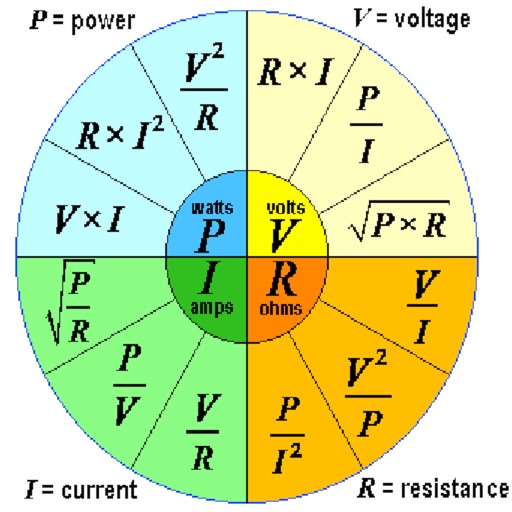
Calculate electrical circuit values by entering two known variables (current, resistance, voltage, or power). Adjust units dynamically for accurate results. Display total resistance and power in the circuit.
Calculate voltage, current, resistance, or electric power by entering any two values. Convert results between normal and scientific notation. Display calculated values clearly.
Calculate conduit bends with offset and 90-degree tools. Determine stub-ups, kicks, and compound angles. Create three and four-point saddles for obstacle navigation. Access NEC-compliant calculations and field-tested utilities for work.
Calculate parameters based on run or total run input. Support multiple units for measurements. Determine maximum and minimum step sets. Copy results to clipboard. Access all features with unlimited subscription.
Convert units between metric and imperial systems including area, distance, speed, temperature, volume, time, weight, energy, and power. Calculate area, speed, distance, and volume with supported units. Switch between units quickly and accurately.
Calculate as angle, percentage, or ratio using a right triangle. Enter two sides to find the remaining values. Display results clearly with unit options. Save and share calculations.
Reference provides synonym, antonym, and definition lookups with expertly reviewed results. Users can refine searches for clarity and context. Access ad-free PRO membership for enhanced browsing. Syncs with writing tools for seamless integration.
Datasheet search allows users to find electronic components. Resistor color codes and markings are decoded for 4, 5, and 6 band codes. Electronic symbols are displayed according to IEC 60617, IEEE 315, and GOST standards.