Plus provides arithmetic and scientific calculations with live expression preview and error detection. Perform operations in exact form, fractions, and scientific notation. Switch between standard and scientific modes. Share results directly.
by Wern Jie Lim★ 4.7133 ratingsUtilitiesFreeData updated 2026-09-12
Perform complex calculations with scientific functions and engineering tools. Input equations, use memory functions, and switch between degrees and radians. Save results and view calculation history.
Perform complex calculations with trigonometric, statistical, and combinatorial functions. Define and evaluate custom equations. Graph mathematical expressions and explore multiple variables. Save and reuse calculations for future use.
Units quickly by typing to filter options. Select a to restrict the second to its category. Save frequently used units to a Favorites list. Browse units manually when needed.
Offers a standard, scientific, and fractions with over 30 scientific operations. Users can add notes to calculation history and share entries. It supports portrait and landscape modes on iPhone and iPad, and split-screen functionality.
Customize the 's appearance with color changes. Switch between basic and scientific modes with over 30 operations. View calculation history and equations. Perform calculations with precision up to 75 significant digits.
Solve equations and graph functions with advanced math support. Perform calculus operations and matrix calculations. Customize settings for precision. Access detailed tutorials and a comprehensive user manual.
MyCalc offers basic and scientific calculation functions. Users can switch between portrait and landscape modes. It supports currency and unit conversions. Results, equations, and conversions can be copied, shared, or saved.
Calculate fractions with addition, subtraction, multiplication, and division. Convert fractions to decimals. Adjust recipe quantities for different serving sizes. Review math problems and convert measurements between cups and teaspoons.
The app allows users to enter and modify formulas while checking them, preventing errors. It provides a history of formulas and answers, supporting various number systems and memory functions for calculations.
Perform complex calculations with support for hexadecimal, octal, and binary. Use RPN mode and multi-line display. Access unit conversions, constants, and scientific notation. View a paper tape and use multiple undo/redo functions.
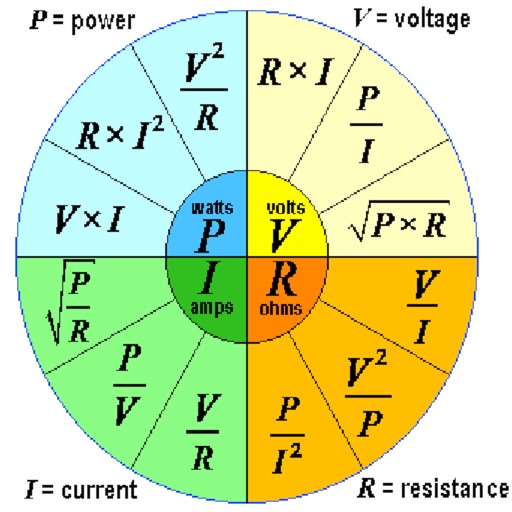
Calculate voltage, current, resistance, or electric power by entering any two values. Convert results between normal and scientific notation. Display calculated values clearly.
Perform complex calculations with root, power, trigonometric, and logarithmic functions. Calculate factorials and double factorials. Draw graphs, use four memory blocks, insert constants, and make notes.
Perform basic arithmetic, scientific calculations, and programmer-specific conversions. Save results to a history log. Switch between different calculation modes and unit conversions.
The app offers a 64-bit calculator with 10 registers for saving values and multiple display options including Hex, Oct, and Bin. It includes trigonometric functions, unit conversions, and combinations/permutations calculations.
Convert measurements between , , and centimeters. Input fractions or decimals for precise calculations. View results on a visual measure display. Perform addition, subtraction, multiplication, and division with measurement values.
The app offers scientific calculations with enhanced precision and supports multiple number bases including decimal, hexadecimal, binary, and octal. It features a 7-segment LCD display and VoiceOver support for accessibility.