
Talk For Me - Text to Speech
Convert to and send messages
Darrin Altman
iPhone Screenshots




Description
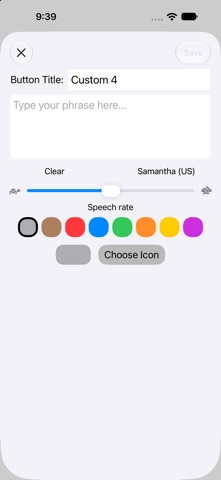
Type into the main area or tap custom buttons to trigger . Use Apple’s enhanced or premium voices via Settings. Supports Personal Voice, FaceTime, and phone calls. Read aloud with adjustable settings. Syncs with Accessibility features.
Your voice deserves to be heard clearly and effortlessly. Built from the ground up by a developer who lost the ability to speak, Talk For Me is engineered with a deep, personal understanding of what truly matters when connecting with others. Whether you are navigating a health issue or simply need a daily tool to assist with communication, Talk For Me bridges the gap.
KEY FEATURES:
• Speech to Call: Seamlessly sends your text-to-speech audio directly into phone calls, FaceTime, Zoom and Google Meet.
• Full Dwell-Compatibility: Re-engineered from the ground up to be 100% navigable via eye-tracking and head-tracking.
• Core Phrase Pack Expansion: A dedicated Library category containing over 2,000 ready-to-use phrases.
• Siri Shortcuts Integration: Trigger your most frequently used everyday phrases directly through Siri without even opening the app.
• Personal Voice Support (iOS 17+): Create a digital copy of your own voice and use it within the app.
• Visual "Karaoke" Tracking: See exactly what is being spoken in real-time. Words are highlighted as they are said.
• Rebuilt Speech Engine: Combine sentences, questions, exclamations, and ellipses (...) in one paragraph and it will all be spoken naturally with human-like emphasis.
• Smarter Number Pronunciation: No awkward commas needed in long sequences like phone numbers, zip codes, or IDs. Just type the numbers naturally, and the voice engine will automatically insert human-sounding pauses!
• Customizable Quick Buttons: Store your most common phrases in 12 main buttons, or swipe up to access four additional pages.
• Favorite Voices: Switch to your favorite voices in an instant.
• Phrase History: Saves your last 50 spoken phrases for easy access.
• Hardware Keyboard Support: Magic Keyboard or external BT keyboard users can utilize native shortcuts (Cmd + F, Cmd + 1, etc.) without touching the screen.
• Library Database: Save unlimited phrases or partial sentences.
• Data Control Center: Easily manage your Main Text Box Speech Rate, Local Backups, iCloud Sync, Appearance, Library Categories, Custom Button Page Titles, and enable Core Phrase Pack.
• Local Backup Snapshots: Create, rename, and store up to 10 instant local backups of your setup. Create different profiles.
• iCloud Sync & Restore: Upload your custom buttons, library phrases, and settings to iCloud. Download them instantly to a new iPhone or iPad to keep your devices perfectly in sync.
• Custom Library Categories: Filter your phrases using custom category chips and easily rename up to four of them in Data & Settings.
• Offline & Private: Works completely offline. No ads, no tracking. Internet is only required when you choose to sync with iCloud.
ADDITIONAL TOOLS:
• Alternate Speech Rate Slider: Visualize and adjust the speech rate directly from the Voice Selector button.
• Secure Privacy Wipe: Tap the Eraser symbol, shake your device (or use a two-finger tap inside the main text box) to permanently wipe the text.
• Seamless Audio Ducking: The voice engine will automatically lower your background media volume while your phrase is spoken.
• Library Search: Find your phrases lightning fast with the search field in the library.
SUPPORTED LANGUAGES:
• Any Voice, Any Language: Talk For Me now fully integrates with your device's native speech engine. We support over 60 languages and regional dialects—if a voice is available in your Apple device settings, it is instantly available in the app.
• Personal Voice Ready: Seamlessly communicate using your own custom-created Personal Voices.
A NOTE ON VOICES:
Go to your iPhone Settings > Accessibility > Read & Speak > Voices to download high-quality voices.
SUPPORT:
User Manual available at MobileTouchTech.com/TalkForMe-manual
Questions? I am an independent developer dedicated to this community. If you'd like to get in touch, report an issue, or just connect, please visit https://mobiletouchtech.com/contact or email me directly at [email protected]