
play:Sub Music Streamer
Stream from your Subsonic server
Michael Hansen
iPhone Screenshots




Description
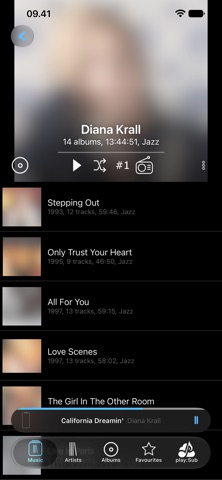
Stream from a Subsonic server to iOS, CarPlay, Chromecast, or Subsonic Jukebox. FLAC, MP3, AAC, and other formats with lossless and gapless playback. Use a 10-band equalizer with genre and scenario presets.
Your music, from your own server, everywhere. play:Sub plays your Navidrome, Gonic, Subsonic or other Subsonic-compatible library on iPhone, iPad and Mac, in the car with CarPlay, on Chromecast or through your server's Jukebox - streamed in the quality you choose, or offline.
NEW: AUTO SYNC
• Keeps your starred songs, albums and artists, your newest albums or any playlist on your device, automatically
• Choose per source: Download to keep it, or Cache to let it make room for other music
NEVER LET THE MUSIC STOP
• Auto DJ keeps playing when the queue runs out, with music related to what you started
• Or pick an Auto Play mode: favorite artists, random albums, newest additions, artist radio, decade radio and more
SERVERS
• Navidrome, Gonic, Airsonic, Ampache, Funkwhale, Booksonic, Subsonic and more
• OpenSubsonic support
• Multiple servers, with easy switching
• Some servers need their Subsonic API turned on
AUDIO
• FLAC, ALAC, AAC, MP3, OGG, WAV, AIFF, WEBM and more, without transcoding
• Lossless and gapless playback, hi-res up to 24-bit/192 kHz
• 10-band equalizer with presets, crossfade and ReplayGain
• Playback speed from 0.5x to 2x
• Audio Visualizer, and lyrics where your server has them
PLAY ANYWHERE
• iPhone, iPad and Mac (Apple silicon): any orientation, multitasking and resizable windows
• CarPlay: your library, the play queue, server switching, and album and artist pages with play and shuffle buttons
• Chromecast and Subsonic Jukebox
• AirPlay, Bluetooth, headphone and car controls, Lock Screen and Control Center
• Home Screen widgets you can play from
• Picks up again after phone calls
OFFLINE
• Download music to keep it, or let the cache fill and trim itself
• Played tracks are cached automatically, upcoming tracks preloaded
• Download or cache single tracks or whole albums, artists, folders and playlists
• Cached audio is upgraded to a better bitrate when available
• Background downloads
• The same app offline: browse, play, star and edit playlists, synced when you are back online
BROWSE AND DISCOVER
• Artists, albums, songs, folders, genres, decades and record labels
• Playlists, favorites, podcasts, audiobooks and bookmarks
• Recently added, frequently played and random
• Artist radio, top songs and similar artists
• Internet radio: your server's stations, plus 20,000+ from radio-browser.info
• Search everything, filter by media folder or show only starred
• Long-press anything for the actions that fit
PLAYLISTS AND FAVORITES
• Create, edit and delete playlists, personal or shared
• Star artists, albums, songs, folders and record labels
• 5-star ratings
MAKE IT YOURS
• Customizable tabs and library order
• Light and dark themes that follow the system, or your own colors
• Alternate app icons
• Sleep timer
CONNECTION
• HTTPS, including self-signed certificates
• Token authentication on Subsonic 5.3+ servers
• Separate bitrates for cellular and Wi-Fi, with overrides for slow or fast Wi-Fi networks
SCROBBLING
• Scrobbles to Last.fm through your server, and updates Now Playing
• Cached plays count too; offline plays are scrobbled when back online
Requires a server with the Subsonic API 1.8 or newer (Subsonic 4.8+; Subsonic itself needs a Premium license for apps). Some features depend on your server, such as top songs, artist radio, similar artists and record labels.