
iPhone Screenshots
Description
Mapruler is application to measure the distance of a map in the trip magazines.
※ Attention: I cannot guarantee the accuracy of the scales.
■ How to use:
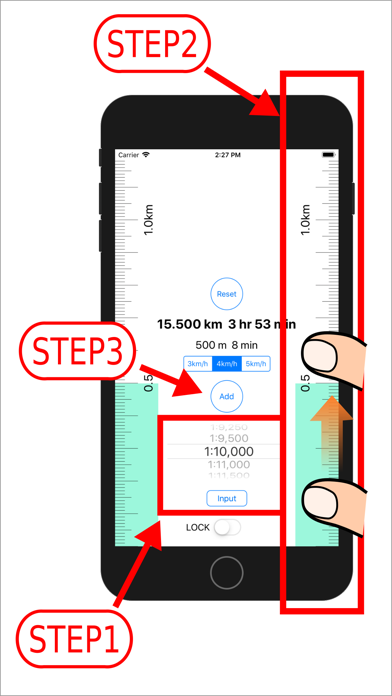
・ You set a scale and put iPhone on a map.(Step1)
・ When you drag a scale, a light blue indicator will be displayed.
・ You drag it to the position that you want to measure.(Step2)
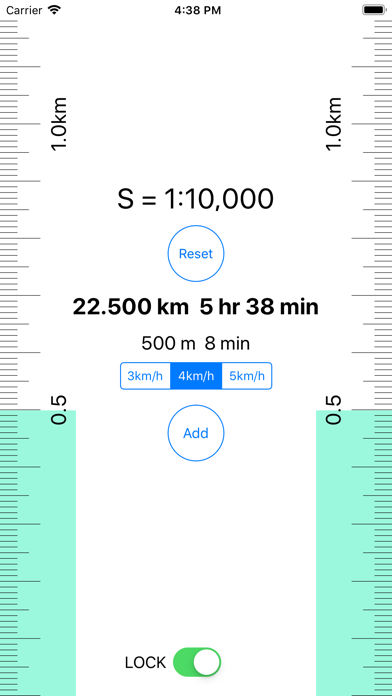
・ The measured value are displayed with the "distance" "travel time".
※ When the time required is within one minute, it is displayed with one minute.
・ You can choose speed among 3km/h, 4km/h, 5km/h.
・ The measured value are added when you tap the button "add".
The result is displayed by a total value.(Step3)
・ When you tap a "reset" button, measured value, an indicator are reset.
・ You can lock a reduced scale with a switch.
Sorry, an advertisement is displayed during unlocking.
・ When you finish application, a total value, measurements, the indicator are reset.
■ Reduced scale setting method
・ The choice of the reduced scale with the picker.
Please choose the reduced scale that you want to set among a picker.
・ Input of the reduced scale denominator
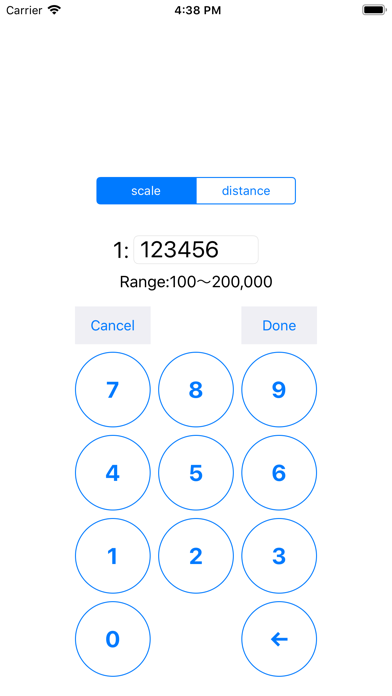
You tap an "input" button. and you tap “scale" button.
You input a reduced scale denominator, and you tap "Done" button.
A scale is displayed in a locked state.
・ Input of the distance
You tap an "input" button. and you tap “distance" button.
You input distance (m) for 1cm in the map, and you tap "Done" button.
A scale is displayed in a locked state.
■ Specification of Mapruler
- reduced scale setting range
1:100〜1:200,000
- Maximum total value
999km
- Indication of the distance
under 100m unit of distance:m(one decimal places)
over 100m〜under 1000m unit of distance:m
over 1000m unit of distance:km(three decimal places)