
iPhone Screenshots

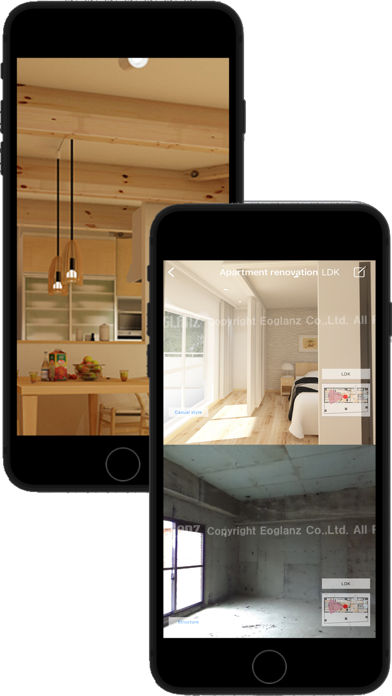


Description
EOPAN is a panorama image viewer for JPEG and EPA files.
You can select different views of a scene to display side-by-side and show popup text and images (for EPA files).
Good Design Award 2014 Best 100
Design for the Future Award
[Main Features]
- EOPAN displays sphere images and pictures taken by an omnidirectional camera (for example, RICOH THETA m15, S, SC1、SC2 and THETA V)
- Move your iPad or iPhone and the screen is smoothly synchronized using the gyro, or drag the screen to rotate the view
- Imports images from 3D CAD “Walk in home”
- Open multiple JPEG files as a ZIP file then change selection while viewing
- Images sharing with apps supported by the sharing function
- Store images locally to view off-line
- EOPAN can display two images side-by-side, so you can compare before-and-after plans or different proposals
- Create EPA files with “EOPAN Cloud”. You can embed links to web pages and YouTube
- using embedding code from EOPAN cloud, you can paste your spherical images into WordPress etc.
[Supported file types]
JPG (sphere type)
ZIP (with sphere type JPG files)
EPA (created by EOPAN Cloud Portal)
[How to import files]
JPEG
1. Direct import of spherical camera image via Wi-Fi
2. Tap Camera Roll icon and choose image
3. Transfer between devices running EOPAN via Wi-Fi P2P
4. Add via Mac OS Finder or Windows iTunes
5. Download from "EOPAN cloud"
- ZIP
1. Transfer between devices running EOPAN via Wi-Fi P2P
2. Add via Mac OS Finder or Windows iTunes
3. Download from "EOPAN cloud"
- EPA
1. Transfer between devices running EOPAN via Wi-Fi P2P
2. Add via Mac OS Finder or Windows iTunes
3. Download from "EOPAN cloud"
Flick the screen downwards to update the image list.