
iPhone Screenshots
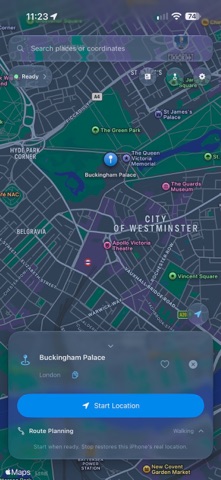


Description
Roam Control is a location testing tool for iPhone, designed for developers, testers and anyone exploring location-based app behaviour on a device they own and control.
Using an intuitive map interface, you can select locations, create routes and simulate movement at different speeds.
KEY FEATURES
• Fixed Locations: Search for a place, enter coordinates or choose a position directly on the map.
• Route Simulation: Plan walking, cycling and driving routes with adjustable movement speeds.
• Manual Routes: Create custom routes using waypoints or freehand drawing.
• Joystick Movement: Explore simulated movement without planning a route in advance.
• GPX Support: Import and export GPX routes for testing and reuse.
• Favourites and History: Save frequently used locations and quickly revisit previous selections.
• Session Controls: Pause, resume, redirect and stop active location sessions. Restore your device's real location when testing is complete.
• Device Setup: Guided pairing and connection management, including LocalDevVPN compatibility.
• Personalisation: Choose light or dark appearance, map styles and preferred measurement units.
• Accessibility: Support for Dynamic Type, VoiceOver and Reduce Motion.
• Multiple Languages: Ten supported interface languages, including right-to-left layouts.
PRIVACY AND CONTROL
Roam Control keeps location selections, routes, favourites, history and pairing information on your device. Optional anonymous usage statistics can be disabled in Settings. A separate anonymous country-level installation count is described in the Privacy Policy.
IMPORTANT INFORMATION
Roam Control is intended for responsible development and testing on devices you own and control.
https://github.com/seanhowarthdev/Roam-ControlLocation simulation can affect other apps that rely on your device's reported position. Always restore your real location before using navigation, safety-critical services or location-sharing features.
Requires iOS 27 or later. Initial device setup and compatible local connectivity are required for location simulation.