
iPhone Screenshots




Description
The events you're looking forward to, front and center. Think of Imminent as a dashboard for your calendar: not everything on it, just the trips, birthdays, bills, and big days worth counting down to — and the ones you can't be late for.
Add a flight, a birthday, a concert, a dentist appointment — or the day the rent is due — and watch it get closer. Far-off events show the days left, the last week shows days and hours, and the final 24 hours tick down live, second by second.
QUICK TO ADD
• Paste a message: copy "my flight lands tomorrow at 2:20pm" and Imminent fills in the title, date, time, and icon for you
• Share from Messages, Safari, or any app
• Import events from your calendar — countdowns move automatically if the event changes, and show the time left while it's happening
• Add the year's holidays at once from your iPhone's holidays calendar — no duplicates, and each one moves to next year's date on its own
• Or just ask Siri: "Add an event to Imminent"
ALWAYS IN VIEW
• Home Screen and Lock Screen widgets: what's next, your favorites, or the one countdown you pick
• A Live Activity on your Lock Screen and in the Dynamic Island for the final hours
• Apple Watch app and watch face complications
• Reminders an hour, a day, or a week before
• Syncs through iCloud to your other devices, and everything comes back on a new iPhone
MAKE IT YOURS
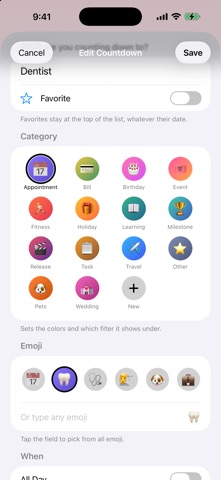
• Favorites stay at the top of the list, whatever their date — keep the big move front and center all year
• Colorful categories for birthdays, travel, bills, events, releases, and more — or make your own, like Pets or Wedding, with its own name, emoji, and color
• Filters for the categories you actually use, most-used first
• Repeats every week, month, year, or every few days — a monthly bill moves to next month when you mark it Done, and shows Overdue if you forget
• Days Since: count up from a milestone, like graduating or quitting smoking, with a notification on day 100, day 1,000, and each anniversary
• Holidays style themselves: Christmas, Diwali, Lunar New Year, Eid, Hanukkah, and more each get their own look
• Pick any emoji for any countdown
• Share a countdown in Messages: friends get a link that ticks down live, with Add to Calendar, and it opens right in Imminent if they have it
PRIVATE WHEN IT NEEDS TO BE
Planning a surprise? Mark a countdown Private and it stays locked behind Face ID, hidden from widgets, your watch, and Siri. Reminders just say "Private countdown."
NO ADS, NO ACCOUNT, NO TRACKING
No ads, no subscription, and no limit on countdowns. There's no account to create: your countdowns stay on your iPhone and in your own iCloud. Imminent collects no data at all.