
iPhone Screenshots




Description
Stop choosing a number base.
Most programmer calculators make you tap HEX or DEC before typing, and picking the wrong one means starting over. DecHex removes that step: whatever you type is shown in two cards at once.
Input as hexadecimal: your input taken as hex, with decimal and hex results.
Input as decimal: the same input taken as decimal, with decimal and hex results.
Just read the card you need. No switching, no guessing, no recalculating.
PROGRAMMER CALCULATOR
- Type 1A and the top card tells you it is 26 in decimal. Type 13 and the bottom card tells you it is 0xD
- Arbitrary precision: add, subtract, multiply and divide beyond 64 bits without overflow
- Word size 8, 16, 32 or 64 bits, signed or unsigned. Bitwise operations and the binary view follow the selected two's complement width
- Live binary display. Tap the binary row to flip individual bits
- Full keypad: A to F, AND, OR, XOR, NOT, shift left, shift right, sign, chained operations
- Backspace removes anything you typed, operators included. Two-step CLR
- A simple layout hides the bitwise column for bigger keys
- Paste understands 0x1F, 0b1010, 0o17, #FF8800, 1Fh and more
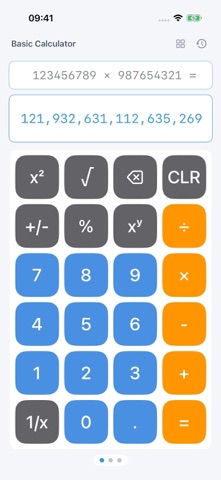
BASIC CALCULATOR WITH SCIENTIFIC MODE
- Simple mode: add, subtract, multiply, divide, percent, reciprocal, square, square root, power
- Scientific mode: parentheses, memory keys, trigonometric and inverse functions, hyperbolic functions, logarithms, exponentials, factorial, roots, pi, e, scientific notation, random numbers, degrees and radians
- Exact results: 0.1 + 0.2 is 0.3 and 1 / 3 x 3 is 1. Addition, subtraction, multiplication and integer powers are exact; division and square roots keep 32 significant digits
- Long numbers that do not fit can be tapped to view and copy in full
10 DEVELOPER TOOLS
Color values, timestamps (seconds, milliseconds, microseconds and nanoseconds detected automatically), Base64, URL encoding, Unicode, hashes (MD5, SHA-1, SHA-256), UUID, JWT decoding, IPv4 subnets and byte units. Results update as you type, and every value can be copied with one tap.
BUILT INTO YOUR DEVICE
- Home Screen and Lock Screen widgets plus a Control Center button (iOS 18 or later) that open any page and match your theme
- Siri and Shortcuts (iOS 16 or later): just say the number to convert or the expression to calculate
- Hardware keyboard input, Return to calculate, Delete to backspace (iOS 17 or later)
- Layouts designed for iPad, with Split View, Stage Manager and trackpad pointer support
MAKE IT YOURS
- 42 color themes, each tuned for light and dark mode. Long press the shift keys to switch
- 8 number fonts and an optional thousands separator
- 7 app icon colors
- Separate switches for key haptics and key sounds
- Each calculator keeps its own history. Tap an entry to reuse the result
- Available in English, Simplified Chinese, Traditional Chinese, Japanese, Korean and Russian
PRIVACY
No network access, no data collection, no account, no ads and no third-party SDKs. Every calculation and setting stays on your device and is removed when you delete the app.
Made for developers who work with registers, memory addresses, color values and bit masks every day, embedded and low-level engineers who convert between decimal and hex all the time, and students learning number bases and two's complement.