
iPhone Screenshots



Description
Ownarr is the fastest way to ask your home media server for something new to watch.
Say “the movie Metropolis in 4K” or tap Request, and Ownarr sends it to your server, which adds it to your library. Yours. Forever.
WHAT YOU CAN DO
• Request by voice: say the title, and add a quality if you like (“in 4K”, “in 1080p”).
• Request in one tap: every search result has a Request button. TV shows include every season.
• Pick your quality: choose one of your server’s quality profiles, or let it decide. Available to server owners and anyone they allow.
• Know when it’s ready: get a notification when a request is approved or lands in your library.
• See what’s popular: rows of the most popular movies and shows across the major streaming services in your region, plus trending and upcoming titles. Tap + on any poster to request it, and anything already in your library is marked.
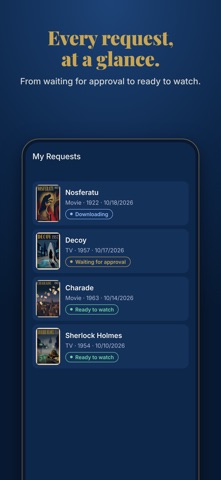
• Track your requests: see what’s waiting for approval, on its way, and ready to watch.
• Request from your wrist: the Apple Watch app takes requests by voice and shows what’s on its way.
• Request without opening the app: say “Hey Siri, download a movie in Ownarr”, or use the Control Center button and Home Screen widgets.
• Use more than one server: add several and switch between them.
WHAT YOU NEED
Ownarr works with your own Seerr server, and with Overseerr and Jellyseerr. Sign in with Plex, Jellyfin, Emby or a local account, the same way you sign in on your server’s website.
No server yet? Tap “Try the demo” to explore Ownarr with a catalogue of classic public-domain films.
PRIVATE BY DESIGN
Ownarr talks directly to your server. There’s no Ownarr account, no ads and no tracking, and Ownarr never stores what you request.
Ownarr is an independent app and is not affiliated with or endorsed by Seerr, Overseerr, Jellyseerr, Plex, Jellyfin, Emby, Radarr or Sonarr. Ownarr does not provide, host or download any content. It sends requests to a media server that you or your household already run.