
iPhone Screenshots




Description
Setomi is a lifting log that starts from the plan you already have. Bring it in from a PDF, a spreadsheet, a photo or a note, and log it set by set on iPhone and Apple Watch.
Everything stays on your own devices. No subscription. No account.
BRING YOUR OWN PLAN • Import a PDF, a spreadsheet (.xlsx or CSV), pasted notes or a photo of your plan • Setomi reads it on your iPhone, shows what it found, and lets you fix any lift before anything is saved • Or start from a template, or build days and supersets yourself • Share a plan with another Setomi user as a file, or as a PDF
LOG A SET IN ONE TAP • One screen per day: sets, reps, rest and last time's weight, ready to tap • Setomi tells you when you've earned more: "Time to increase" shows up when you hit the top of the rep range • A rest timer that starts on its own, runs on the lock screen and Dynamic Island, and taps you when rest is over • Warm-up advice with the plates to load on each side, supersets, timed holds, to-failure sets, per-set weights and optional cardio • Swap a lift mid-workout for a close equivalent that fits the equipment your gym has • Cards, or one lift at a time in Focus; pounds or kilograms
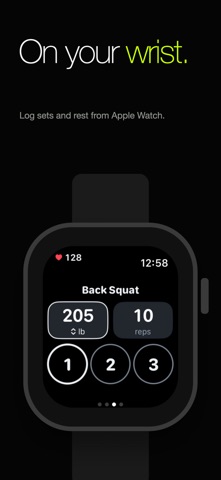
APPLE WATCH • Today's lifts on your wrist: tap the set circles to log, change weight and reps with the Digital Crown • Rest timer that taps you, live heart rate with zones, calories and your Activity rings • Run cardio blocks from the watch as their own Apple Health workout • Complications and a Smart Stack widget show your next lift
SEE YOUR LIFTS CLIMB • Estimated one-rep max, a chart of every lift's top set, new records and weekly streaks • A muscle map of what you've trained, and a monthly report and year in review • A Journal of every workout: compare with last time, add notes, see heart rate and recovery
SHARE WITH YOUR COACH • Export your Journal as a PDF with graphs, or as CSV or JSON, and send it to a coach or trainer • Back up everything to a file and restore it any time
A LIBRARY THAT KNOWS YOUR GYM • About 480 lifts, including Olympic lifts, CrossFit and Hyrox movements, each with muscles worked and a short cue • Drawn icons that move to show the technique (stop them in Settings or with Reduce Motion) • Tell Setomi which gym you use and it hides what that gym doesn't have; add your own lifts • Search by name or nickname (RDL, OHP, skull crushers) • "Why this lift" research notes appear only where a verified study backs them up
MAKE IT YOURS • Eight themes and nine app icons, home screen and lock screen widgets, reorderable Home cards • Reminders on the days you pick, plus Siri and Shortcuts: "Start my workout in Setomi"
YOURS ALONE • Free, with no subscription, no account, no ads and no tracking. Nothing is sent to us. Your plans and history live on your iPhone, and the Watch app talks only to that iPhone • Optional: connect Apple Health to save lifting and cardio as workouts, to read your bodyweight for calorie estimates, and to show strength workouts from Apple Fitness or your Watch in your history • Optional: note where you trained and the weather (Apple Maps and Apple Weather, location rounded to about 1 km)
Fast, readable at large text sizes, and calm to use between sets.