
iPhone Screenshots





Description
mini365admin puts the everyday Microsoft 365 helpdesk on your iPhone, iPad and Mac. Sign in with your own work account and handle users, devices, sign-in problems and security lookups in seconds — wherever you are.
USERS
• Search your directory and open full user profiles
• Enable or disable accounts and revoke sign-in sessions
• Reset passwords — generated passwords are shown once, never stored
• Manage group memberships and assign or remove licenses
SIGN-IN METHODS & MFA
• See every registered method: Authenticator, phone, passkeys, Windows Hello and more
• Remove a lost phone's method, or require MFA re-registration
• Issue a Temporary Access Pass, with lifetime limits from your tenant's policy
WHY CAN'T THEY SIGN IN?
• Recent sign-ins with error codes, failure reasons and Conditional Access results
• Directory audit history: who changed what, and when
• MFA registration report: find who still isn't registered
INTUNE DEVICES
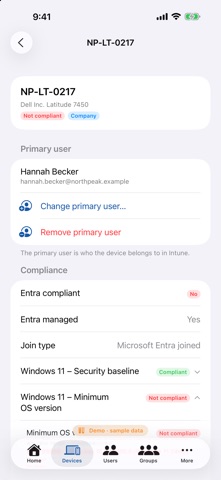
• Device list and detail, compliance per policy, with the exact failing settings
• Change or remove a device's primary user
• Sync, restart, lock, reset passcode, Defender scan, retire and wipe — destructive actions require typing a confirmation
• BitLocker recovery keys and Windows LAPS local admin passwords, revealed only when you tap
BUILT FOR ADMINS
• Home dashboard: unregistered MFA users, non-compliant devices, failed sign-ins, licences near capacity
• Choose which sections live in your tab bar
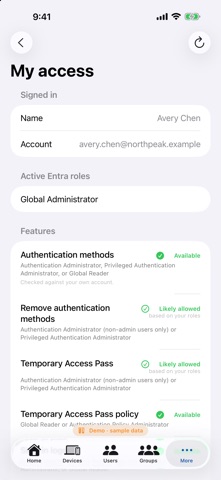
• "My access" shows which features your admin roles allow — and when something is unavailable, the app tells you exactly which role, licence or consent is missing
• Explore the full app with sample data — no Microsoft account needed
PRIVATE BY DESIGN
• Talks directly to Microsoft — no servers of ours in between, no analytics, no ads
• Delegated permissions only: the app can never do more than you can do in the admin portals
• Secrets are hidden until tapped, never logged, and copied to a clipboard that clears after 60 seconds
Requirements: a Microsoft Entra ID work account with the appropriate admin roles. Some features require Microsoft Entra ID P1/P2 or Microsoft Intune licences, and a one-time admin consent in your tenant.
mini365admin is an independent app from ConnectIT Technologies and is not affiliated with, sponsored or endorsed by Microsoft. Microsoft 365, Microsoft Entra, Intune and BitLocker are trademarks of the Microsoft group of companies.