
iPhone Screenshots




Description
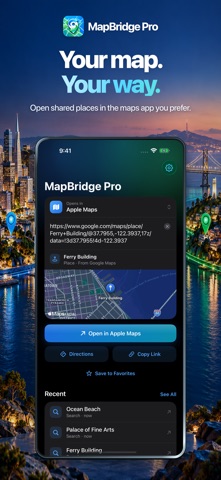
Open shared places in the maps app you prefer.
MapBridge Pro converts supported links from Apple Maps, Google Maps, Waze, OpenStreetMap, and Bing Maps, plus addresses, place searches, coordinates, and full Plus Codes. Locations open in Apple Maps, Google Maps, or Waze. Choose a maps app, then open a place, start directions, or copy a converted link.
YOUR PLACES, CLOSE AT HAND
Save Favorites with optional names and find recent places again. Both stay on your device. Favorites remain when you clear or turn off recent history. Copy coordinates where available, and undo an accidental removal. Ask Siri to open a Favorite or get directions to it.
DIRECTIONS YOUR WAY
Touch and hold Directions to choose Driving, Walking, Transit, or Cycling where your maps app supports it. Set a default travel mode in Settings. The saved default keeps a route’s existing mode and does not change copied links. Waze supports driving.
CHECK BEFORE YOU GO
See a map preview when a place has a position, and review conversions that may lose important route or place details. Each maps provider calculates its own route, so roads, stops, and arrival times may differ. Show Map Previews in Settings controls requests for Apple Maps imagery.
USE IT WHERE YOU FIND A PLACE
Convert a shared link with the Share Extension. Install optional Open in My Maps or Directions in My Maps Shortcuts. Enable the Safari extension for supported map pages; its toolbar can also convert OpenStreetMap and Bing Maps pages on request. The optional setup checklist walks you through each choice, and you can skip it or return later.
QUICK ACCESS
Use Open Copied Link from the Home Screen, Control Center, or Lock Screen. The system control requires device authentication and opens MapBridge Pro before the app reads the clipboard. Built-in actions are also available in Siri and Shortcuts.
PRIVACY CHOICES
No device-location permission is needed. Favorites and recent places stay local. Optional app activity sharing starts off, and returning-use measurement has a separate choice. Feedback is reviewed by you before you send it.
MapBridge Pro does not change your device's default maps app. Links that iOS opens directly in another maps app cannot be intercepted. Short-link expansion needs network access, except OpenStreetMap short links decoded on the device. Some provider-specific links or features cannot transfer. Safari access and personal Shortcut installation are optional and require your approval.