
iPhone Screenshots



Description
Serve Receive helps volleyball coaches plan legal serve receive formations for all six rotations. One of its biggest benefits is helping you avoid illegal positioning: as you drag players, the app adjusts the formation to respect volleyball's overlap rules and shows any positioning problems immediately. Build your lineup with confidence, then share it with your team.
BUILT FOR THE WAY COACHES WORK
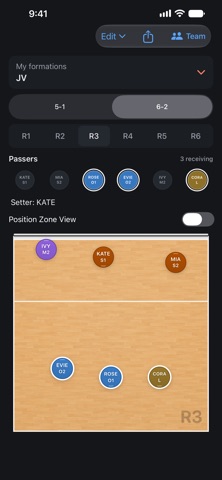
• Set up a 5-1, 4-2 or 6-2 system and see every rotation laid out on court
• Drag players into place while the app keeps their relative positions within the overlap rules
• Tap a player to see who they must stay in front of, behind, or beside
• Red rings and guide lines show any players who are out of position
SMART STARTING POINTS
• Smart Setup starts from coached 5-1 receive formations with O1, O2 and the libero passing
• Court Position starts every player in their standard rotation zone
• The libero automatically takes the back-row middle's spot
• Smart Arrange and Reset rework a single rotation without touching the others
YOUR PASSERS, YOUR WAY
• Choose who receives in each rotation, from zero to six passers
• Players you've placed by hand stay put when you change passers
• Clear warnings when a rotation has fewer than two passers
YOUR TEAM ON THE COURT
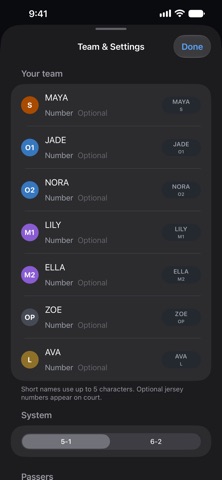
• Add player names and jersey numbers for every player
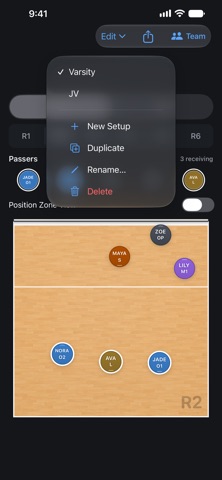
• Keep separate named setups for varsity, JV or an alternate lineup
• Duplicate a setup to try an idea without losing the original
• Position Zone View shows each player's standard zone
• Show or hide player names and position badges
• Undo moves, passer changes and rearrangements
SHARE WITH YOUR STAFF
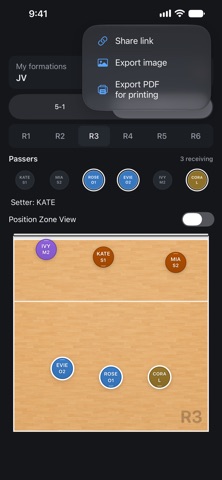
• Send a link to all six rotations. Coaches without the app can open it in a web browser
• Export an image, or a PDF laid out for printing
• Open links from other coaches as a preview, then save them as a new setup
MADE FOR IPHONE AND IPAD
• On iPhone, swipe through one rotation at a time
• On iPad, see all six rotations at once
• Use Siri: "Show rotation 4 in Serve Receive" or "Who is receiving in Serve Receive"
• Light and dark appearance
No account. No ads. Your setups stay on your device unless you share them.