
iPhone Screenshots


Description
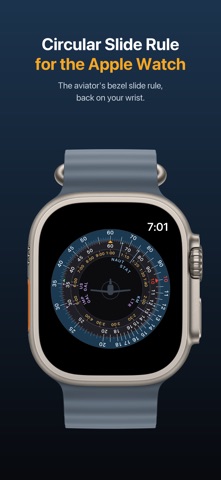
This simple circular slide rule works the way your aviator watch does. For rate/time calculations it can be faster than a calculator: set the rate once and read every distance and time straight off the dial, without typing anything. If you're an aviator who would rather use a slide rule than a calculator, try this app. It is much easier than trying to punch numbers on a watch calculator. We created it for the watch, but it works on the iPhone and iPad, too.
Rotate the outer ring with your finger or with the Digital Crown. Let go mid-turn and it spins on and coasts to a stop. Slow down and the crown gets
finer under your finger, so you can settle exactly where you meant to. A click marks each numbered graduation passing the rate index — feedback only, never a detente, so the dial will never nudge you onto a mark you did not choose.
THE FACE
Three concentric logarithmic scales, drawn to the proportions of the real thing.
• The outer scale carries rate, distance, fuel and quantity, and it is the ring that turns.
• The minutes scale sits inside it, fixed, with the rate index locked at twelve o'clock. The one pointer you read everything against never moves.
• The hours scale runs 1:00 to 10:00 beneath, so elapsed time reads directly without converting from minutes.
Complications on the watch face open it in one tap. Where you left the dial is where you find it, for a day.
TWO CONCENTRIC LOGARITHMIC SCALES MAKE THE MATH EASY
Both rings are logarithmic, and both cover one decade — 10 round to 100 in a single turn. Line up any number on the outer ring with any number on the inner ring and you have fixed a ratio. Every other pair of numbers round the face now holds that same ratio, in both directions, all at once. That is the whole mechanism. A speed problem, a fuel problem and a multiplication are the same act performed on different labels.
SET THE SPEED OVER 60, AND CALCULATE THE DISTANCE AND TIME
Turn the outer ring until your groundspeed sits on the amber rate index — the 60 mark at twelve o'clock. The dial is now a table of that speed. Any time on the minutes ring reads its distance on the outer ring, and any distance reads its time. You are not stepping through a calculation; you are looking one up.
For example set 120 (knots) on the amber 60 index at the top. Look for 2:00 (hours) on the inner ring. The middle ring at that point is 120 (for 120 minutes) and the outer ring is 240. Fly 120 knots for 2 hours and you travel 240 nautical miles. Want to fly 300 miles at 120 knots? Look for 30 on the outer ring. The middle ring shows 15 (for 150 minutes) and the inner ring says 2:30 (for 2 hours 30 minutes). Read any time against any distance, in either direction.
FUEL BURN WORKS THE SAME WAY
Nothing about the method changes when the units do. Put your fuel burn rate on the rate index instead of your speed, and the outer ring reads gallons where it read miles.
MULTIPLICATION
Here the rings stop being speed and time and go back to being plain numbers. The mark you work against is the red 10 — the unit index — because setting a number over 10 fixes the ratio at that number divided by ten.
For example, turn the outer ring until 12 sits over the red 10 index. Find the multiplier, 8, on the inner ring — that is the graduation marked 80, since the ring is labelled across one decade and a mark stands for its digits at any size. The answer is opposite it on the outer ring: 96.
The setting holds for every multiplier at once, so with 12 on the index the face has already worked out 12 × 3, 12 × 7 and 12 × 8. Slide along the inner ring and read them off.
DIVISION
Division is the same move in reverse. Instead of setting the number against the index, you set it against its divisor — and then the index (10) is where the answer appears.
WHAT IT DOESN'T DO:
There's no keypad and no equals key. Figure it out and calculations are much easier on the Apple Watch