
iPhone Screenshots


Description
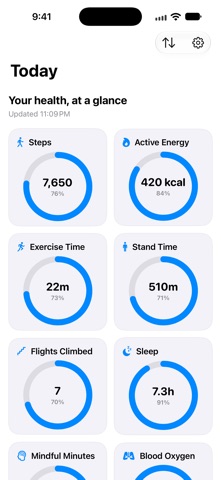
See the health metrics you choose in one calm, customizable dashboard.
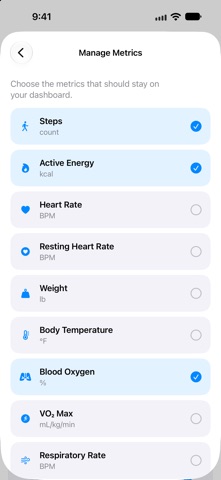
Health Metrics Dashboard reads selected data from Apple Health and presents it as clear values and progress gauges. Pick the metrics that matter to you, set optional goals, and keep an eye on changes over time.
Make it your dashboard
• Choose from steps, active energy, heart rate, resting heart rate, weight, body temperature, blood oxygen, VO₂ max, respiratory rate, exercise time, stand time, flights climbed, sleep, mindful minutes, water, time in daylight, and workout distance for walking, running, cycling, hiking, and swimming.
• Set optional goals. Goal-based tiles show progress; leave a goal blank for a simple reading.
• Add trend tiles to compare today with yesterday, months, years, or all-time history.
• Choose daily, weekly, monthly, or yearly totals for workout-distance metrics.
• Add Home Screen widgets and Apple Watch complications, then choose the metrics you want to see.
• Choose system default, metric, or US customary measurements.
A clearer training load
Training Load is calculated by this app as a rolling 7-day total from available HealthKit workout-effort scores. It is not an Apple-provided overall training-load value. Sleep is based on asleep stages; the app does not create a sleep score.
Your Health data stays under your control
Choose which Health metrics the app may read in Apple’s permission prompt; access can be managed in Health. The app only reads HealthKit records and does not write to Health. Your latest snapshot and preferences are stored locally and synced with the companion Apple Watch. No account is required.
Health data availability depends on your devices, apps, and Health permissions. Readings are for personal reference only and are not medical advice, diagnosis, or treatment.