
iPhone Screenshots


Description
Keep your recipes and the memories that make them yours.
Recipe is a calm, personal recipe book for iPhone and iPad. Save the meals you make, the notes you trust, and the photos and stories you want to remember.
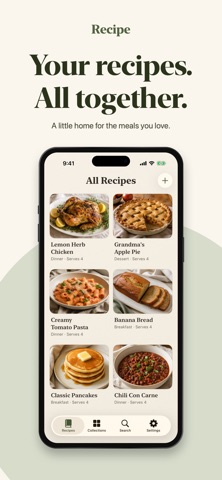
YOUR RECIPES, ALL TOGETHER
Write and edit ingredients and directions, add a cover photo, and check off ingredients as you cook. Reset the checks when you make the recipe again. Duplicate a recipe to try a new variation without changing the original.
A COLLECTION FOR EVERY OCCASION
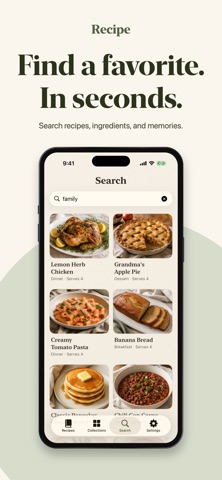
Organize recipes into your own collections and private favorites. Search your book to find a dish, an ingredient, or a familiar note.
KEEP THE MEMORIES, TOO
Remember when you served a recipe, who enjoyed it, and what you would change next time. Attach multiple photos to a memory and keep your personal notes with the recipe.
BRING RECIPES INTO YOUR BOOK
Import from supported recipe websites through your browser's Share menu. Scan one recipe-card photo on your device, review the text, and edit the recipe before saving. Import editable recipes shared by other Recipe users. Website support and scanning accuracy vary; you stay in control of what is saved.
KEEP YOUR BOOK ON YOUR OWN DEVICES
Your book is saved locally and works offline. Optional private iCloud sync connects your own iPhone and iPad when you enable it. Sync includes changes and deletions, with explicit choices for conflicting versions. This version syncs when Recipe is active and supports books up to 40 MB of encoded data; larger books remain usable locally.
SHARE A DISH, KEEP YOUR MEMORIES PRIVATE
Share a readable PDF or an editable Recipe file containing the recipe's cooking details and cover photo. Your private notes, memories, favorites, and collections stay out of individual recipe shares.
TAKE YOUR BOOK WITH YOU
Export a complete JSON backup with your recipes, private text, organization, and saved photos. Restore supported Recipe backups after reviewing the replacement preview. Export Markdown for a readable copy of your book's text. Keep independent backups: sync is separate from backup.
Start with a short guided tour of the main controls, and replay it from Settings → About.
Choose Light, Dark, Midnight, or your device's appearance. Enjoy native iPhone controls and an iPad layout with room to read and browse.
One purchase. No subscriptions or in-app purchases. No Recipe account, advertising, or tracking SDKs.
Requires iOS or iPadOS 18 or later. Camera and photo use are optional. Recipe-card scanning works without Apple Intelligence; additional on-device text organization requires an available supported model on iOS/iPadOS 26 or later, and image corrections require supported image capability on iOS/iPadOS 27 or later. Review recognized text and quantities before saving.