
iPhone Screenshots



Description
Know what every shift is worth.
TipTrack3r is a tip tracker for servers, bartenders, and other tipped professionals. Record your tips, hours, and optional hourly pay, then see your earnings in clear weekly and monthly summaries.
TRACK YOUR EARNINGS
• Log credit tips, cash tips, and tip-outs
• Add hours worked and hourly base pay
• See total earnings and average earnings per hour
• Review and edit shifts in compact history cards
FIND YOUR BEST SHIFTS
• Explore Earnings Insights for your strongest jobs, shifts, and weekdays
• Compare this week with your usual earning pace
• View earnings by day in a calendar
MAKE IT YOURS
• Manage multiple jobs with individual names, colors, and icons
• Personalize dashboard cards, themes, and displayed statistics
• Choose a POS format per job for receipt scanning, or use automatic detection
• Scan supported checkout slips into an editable draft and attach receipt images
PLAN AND LOG WITH LESS EFFORT
• Subscribe to work schedules using compatible iCalendar links from providers such as 7shifts and HotSchedules
• Set logging reminders before, at, or after a scheduled shift ends
• Start and end a live shift timer
• Ask Siri about earnings and insights, log tips, and use supported Shortcuts actions
• Access quick actions from Home Screen widgets and Control Center
SHARE AND PROTECT YOUR RECORDS
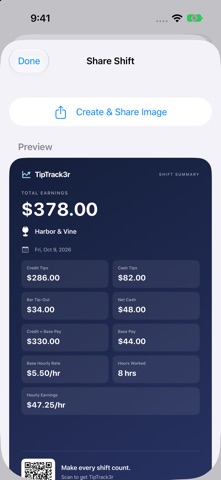
• Create shift-summary images with the details you choose, including hours and hourly earnings
• Add an optional QR code so friends can find TipTrack3r on the App Store
• Import and export shifts with CSV files and create automatic local backups
• Sync jobs and shifts through your private iCloud account
• Protect the app or hide earnings with Face ID, Touch ID, or your passcode
• Restore accidentally deleted shifts
No account or third-party sign-in is required. Optional features can be enabled in Settings. Schedule subscriptions require a compatible calendar feed. Receipt recognition and imported schedule details should be reviewed before saving.