
iPhone Screenshots




Description
Never lose track of what you're watching.
Bingester keeps track of the shows you're watching, remembers exactly where you left off, and tells you what's airing today and what's ready to watch.
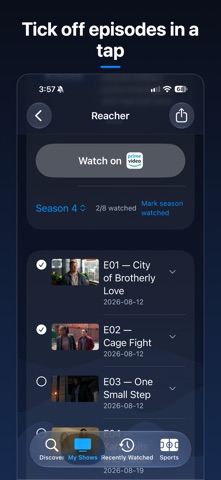
Add a show once and every season and episode is there. Mark episodes watched as you go, see your progress at a glance, and always know what's next.
KNOW WHAT'S ON
• See the shows you follow that air today
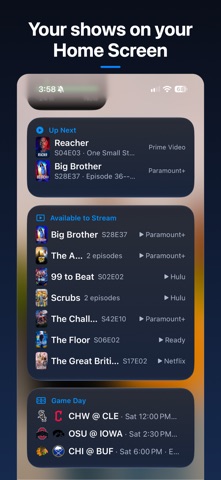
• See episodes that are ready to watch
• If nothing is airing, see what's coming next
• Get notified when new episodes are available
ALWAYS KNOW WHERE YOU LEFT OFF
• Track every season and episode
• See your progress at a glance
• Mark individual episodes or entire seasons watched
• Pick up exactly where you stopped
KNOW WHERE TO WATCH
Optionally connect your streaming services to see where your shows are available and open them directly in the service's app.
WIDGETS
Put Up Next, Airing Today, Game Day, and your new-episode count on your Home or Lock Screen.
YOUR LIBRARY, YOUR DEVICES
iCloud keeps your shows and watched episodes in sync between iPhone and iPad.
FOLLOW YOUR TEAMS
Track NFL, NBA, MLB, NHL, WNBA, college football, and men's and women's college basketball. See upcoming games, where they're airing, and live scores.
PRIVATE BY DESIGN
No account. No ads. No tracking. No analytics. Your library stays on your devices and in your own iCloud.
Bingester was built for people who watch a lot of TV and just want to know:
What's on? What have I watched? What's next?