
iPhone Screenshots


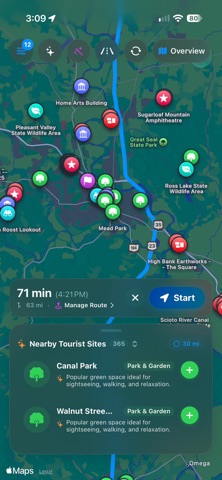


Description
WanderWay turns everyday drives and road trips into opportunities for discovery.
Choose a destination, build a multi-stop route, or generate a Sunday drive loop. Discover covered bridges, scenic overlooks, historic sites, museums, monuments, parks, ruins, and other attractions you might otherwise pass without noticing.
Follow visual and spoken turn-by-turn directions with remaining distance, travel time, and estimated arrival. Advance maneuver guidance, automatic rerouting, and landscape layouts keep essential trip information easy to see.
One purchase. No ads. No subscriptions. No selling your personal data.
SUNDAY DRIVES & CUSTOM ROUTES
• Generate a Sunday drive circuit starting and ending at your location, with duration options from 30 minutes to 3 hours
• Prioritize any of 16 sightseeing categories, including covered bridges, museums, viewpoints, historic markers, parks, and castles
• Prefer routes that avoid highways
• Enable “Drive-by sights only” when building a curated trip to select roadside sightseeing categories; visibility and access vary by place
• Generate suggested stops along an existing route
• See approximate detour-time estimates before adding stops
• Search destinations, add stops, and reorder your itinerary with drag and drop
• Review estimated arrival times; save trips and favorite places for later
• Choose a nearby search radius of 1, 3, 5, 10, 20, or 30 miles
• Set toll-road and highway avoidance preferences
• Choose imperial or metric distance units
EXPLORE WITH CARPLAY
Plan and follow your route on a compatible CarPlay display.
• Start navigation using destination search, a saved trip, or a favorite place
• Search for destinations by voice
• Browse nearby sights and approximate detour times
• Filter nearby discoveries by drive-by or walk-in categories
• Adjust search radius and categories from Nearby Stops during navigation
• Review your route, remove intermediate stops, or end navigation
• Follow turn-by-turn guidance with distance and arrival estimates
• Mute spoken guidance, pan and zoom the map, or recenter on your location
ASK SIRI
• “Navigate with WanderWay”
• “Start my saved trip in WanderWay”
DISCOVER MORE ALONG THE WAY
Browse nearby discoveries as your journey unfolds. Open a place to explore available descriptions, photos, visitor details, and source links before adding it to your trip. Optional U.S. National Register of Historic Places listings help you find more historic locations.
TOOLS FOR LONGER JOURNEYS
• Spoken POI highlights with directional cues such as “Ahead on your right”
• A post-drive souvenir showing the latest drive’s duration, distance, and narrated sights, with favorite saving and sharing
• Spoken directions with natural distance calls, such as “In 2 miles, turn right”
• A choice of system voices, including compatible Enhanced and Premium voices installed on your iPhone
• Advance and near-turn reminders, with tap-to-repeat instructions on iPhone
• Automatic rerouting after a confirmed route deviation
• Adjustable POI narration frequency and detail
• Download tourist information along your route for areas with limited connectivity
• Navigation details on the Lock Screen and in the Dynamic Island on supported iPhones
• Cached tourist information for previously loaded areas
• Background location support during active navigation
• Light and dark appearance, landscape layouts, and Dynamic Type support
BUILT FOR IPHONE
Built around iOS with Apple Maps, system voices, Siri, and CarPlay.
Always follow posted signs and road conditions. Set up your trip before driving and interact with the app only when it is safe to do so.