
iPhone Screenshots
Description
BEFORE PURCHASING
KP Viewer requires a Kemper Profiler Player or Profiler Stage and a direct USB connection.
• Lightning iPhone or iPad: USB-B-to-Lightning cable
• USB-C iPhone or iPad: USB-B-to-USB-C cable
Connect the cable, allow the Kemper to power on completely, then open KP Viewer. The app will not function without a compatible Kemper device and cable.
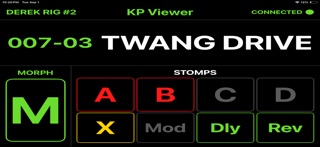
KP Viewer gives Kemper Profiler Player users a clear, easy-to-read display for live performance.
Connect your iPhone or iPad to your Kemper Player and KP Viewer provides the information you need at a glance, without navigating through menus.
KP Viewer displays:
• Current Bank and Rig
• Rig Name
• Effect status for A, B, C, D, X, MOD, DLY, and REV
• Morph status
• Automatic tuner display
The interface is designed to be simple, highly visible, and useful on stage, making an older iPhone or iPad a practical dedicated display for your Kemper Player.
KP Viewer is an independent application and is not affiliated with or endorsed by Kemper GmbH.