
iPhone Screenshots




Description
Renovations become difficult when responsibilities, deadlines, photos and decisions are scattered across messages and camera rolls.
RenoTrace is a private remodel tracker built for homeowners. No account is required, and the app does not upload your project data to a server.
TASKS AND DEADLINES
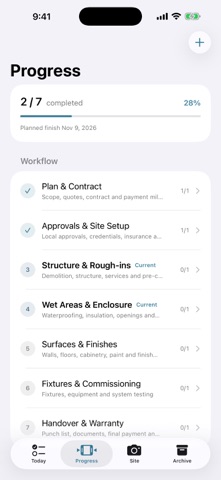
Organize work by stage, owner, location and due date. Use editable checklists to review each checkpoint. Photos are always optional and never block task completion.
PROJECT-SPECIFIC CHECKPOINTS
Start with suggested workflows for a whole-home renovation, kitchen remodel, bathroom remodel, new-home handover or a custom project. Regional prompts help you remember to confirm applicable permits, inspections, property approvals and licensed trades without forcing a one-size-fits-all process.
SITE RECORDS AND CHANGES
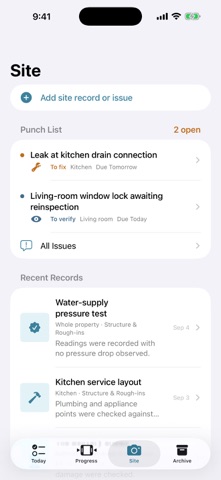
Save progress notes, inspections, deliveries and change orders. Record cost impact, schedule impact and who confirmed a change.
PUNCH LIST FOLLOW-UP
Capture an issue, assign an owner and due date, record the fix, verify it, send it back when needed, or reopen it later. The full activity history stays with the project.
PHOTO PDF REPORTS
Generate a paginated PDF containing every task, open and closed issues with their activity history, all site records and all available photo evidence. Share the file using the standard iOS share sheet.
PROJECT BACKUP
Export a complete project backup containing tasks, issues, activity history, site records, change details and photos. Restore it later as a new property without overwriting projects already on the device.
MULTIPLE PROPERTIES, FULLY OFFLINE
Manage more than one property or open a sample project before creating your own. Text and photos are stored locally on your device. If iPhone or iCloud Backup is enabled, Apple may include local app data according to your system settings.
RenoTrace helps homeowners document and follow up on renovation work. It does not replace a licensed inspector, building professional, authority approval or legal advice.