
iPhone Screenshots




Description
One kettlebell. A clock you can read from the floor. A chalkboard that says what a set is.
SingleBell is a practice app for people who train with a single bell and would rather not think about their phone once the set starts. It reminds, it doesn't teach: learn the lifts, then come back.
TODAY'S PRACTICE
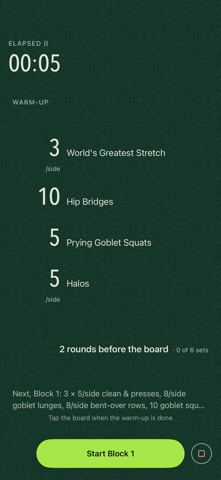
One card, dealt fresh each morning: a warm-up, a kettlebell complex around the day's lift, a bodyweight finisher. Clean & press, one-arm swings, the snatch — the lift you have practised least recently leads. Run it at your own pace, striking each set as you finish it, or timed, on the clock. Short or Standard. Tap Light, Right or Heavy when you finish and the next practice led by that lift adds or drops a set. The day is dealt once and holds until midnight; the week beside the date shows what it has had, and a tap opens the practice calendar.
KETTLEBELL CLASSICS
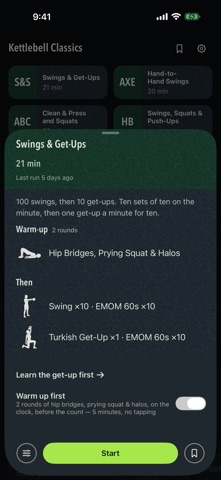
Six protocols people already run, at the top of Today, each adjustable before you start: Swings & Get-Ups; Swings and Power Push-Ups; Hand-to-Hand Swings; Clean & Press and Squats; Swings, Squats & Push-Ups; Clean & Press Ladder. Every card opens a chalkboard first — the practice written on slate, each move beside its picture, its timing stated, a warm-up first if you want it. Nothing starts by accident.
MAKE YOUR OWN
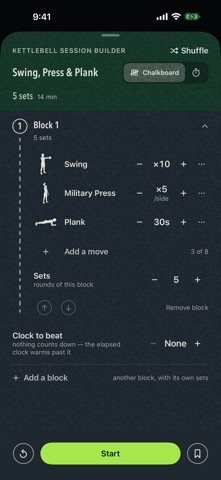
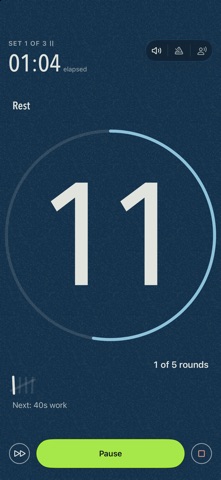
The Builder: blocks of moves in the order you chalk them, each run at your own pace, on one clock for the whole block (Tabata, EMOM, AMRAP), or with each move on its own clock as stations — and the same practice runs at your own pace or timed. The Intervals Timer: work and rest in rounds, rounds in sets, read back to you in one sentence. Short mobility sessions for the days in between. Save what is worth repeating.
EVERY MOVE, DRAWN
Every move has its own figure and a sheet one tap away: four cues, the mistakes to watch for, and how the board counts it.
A ROOM YOU CAN READ FROM THE FLOOR
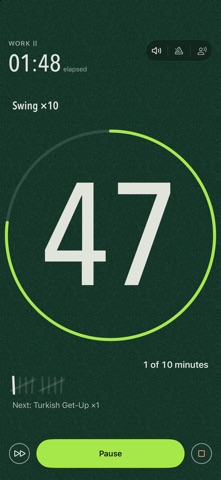
Huge digits. The whole room changes colour with the phase — green for work, blue for rest — so you know where you are with the text blurred out. Beeps that cut through music and keep playing when the screen locks, a voice that names each block if you want it, a clock that survives a phone call or the app being closed. Turn the phone on its side and the room turns with it. The finish happens where the practice was: put the bell down, say how it felt — and if a stray tap finished it, Undo is right there.
THE PRACTICE OFF THE SCREEN
The running practice is on your Lock Screen and in the Dynamic Island, with Pause and the room's own next step. Pair an Apple Watch and the same card is in your Smart Stack, with nothing to install on the watch. Two home-screen widgets show today's practice and the week. Say "Start today's practice in SingleBell" or "Start swings and get-ups in SingleBell" to Siri, or put either on the Action Button. Mirror the phone to a TV and the clock gets a room drawn for that screen.
NOTHING LEAVES THE PHONE
No account. No sign-in. No analytics. No network code at all — the app cannot send anything anywhere. It remembers your settings, the practices you save, every practice you finish and the days you practised, all on your phone, all gone with the app.
Requires iOS 18. The Smart Stack card needs a paired Apple Watch on watchOS 11.
Train within your ability, and stop if a rep feels wrong.