
iPhone Screenshots




Description
Anything to PDF in one tap.
SimplyPDF turns photos and screenshots into a clean PDF the moment you share them. No account. No subscription. No uploads. Everything happens on your iPhone.
ONE TAP, DONE
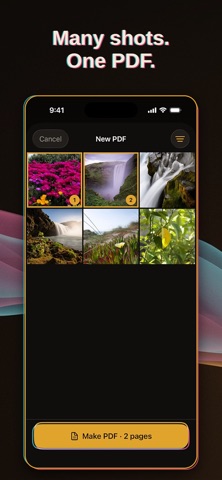
Select images in Photos or any other app. Tap Share, then tap SimplyPDF. Your PDF is built instantly and ready to send. There are no extra screens and no waiting.
PICK FROM INSIDE THE APP
Prefer to start in SimplyPDF? The built-in picker puts your recent screenshots and photos right in front of you. Choose a few and your PDF is ready.
EDIT ONLY IF YOU WANT TO
Most PDFs need no editing. When one does, you can reorder, rotate, crop, duplicate, and delete pages. Set page size, margins, and image quality to suit the job.
EVERY PDF, EASY TO FIND
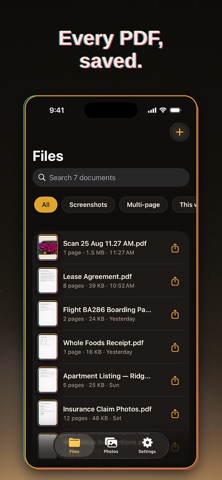
Your PDF library lives inside the app and also appears in the Files app. Find any document in seconds, then share, print, or save it wherever you like.
PRIVATE BY DESIGN
Nothing leaves your phone. SimplyPDF works fully on-device. No account, no tracking, no network access. Your photos stay yours.
PAY ONCE. OWN IT.
SimplyPDF is a one-time purchase of $1.99. No subscription. No ads. No upsells. Every feature, forever.
BUILT WITH CHARACTER
A distinctive 1970s print-shop design with color-plate animations makes a simple task a small pleasure.
Receipts, notes, forms, tickets, screenshots, sketches. If it is an image, it can be a PDF in one tap.
Get SimplyPDF and make your next PDF in seconds.