
iPhone Screenshots


Description
The trouble with our phones isn't that we use them too much. It's that we use them too often. Still Waters helps you create a quiet space by setting your phone down and tuning in to your own reality.
To start a session, open the app and place your phone face-down. Still Waters will begin recording the minutes you spent being present.
HOW IT WORKS
• Tap Start and set your phone face-down.
• Still Waters feels the moment it settles and confirms with a quiet double pulse.
• Leave your phone to be present with yourself or the people around you.
• Lift the phone and your session is saved.
A DAILY RHYTHM
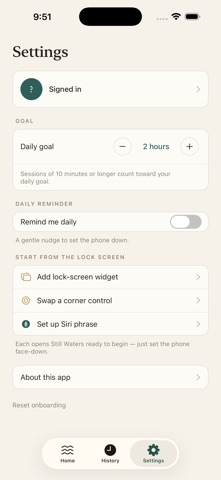
Set a daily goal and watch a progress ring fill as you go. Sessions of ten minutes or more count, and a streak marks the days you follow through.
SEE YOUR TIME RECLAIMED
History shows your week, month, and half-year at a glance: total hours, days at goal, and a quiet chart of the time you've set aside to be still.
START WITHOUT THINKING
Begin a session from a lock-screen widget, a Control Center button, or just by asking Siri. A daily reminder can nudge you to set it down at a time you choose.
BUILT TO STAY OUT OF THE WAY
• Works in the background; lock your screen and the timer keeps time.
• A live lock-screen timer shows your session in progress.
• Your sessions sync privately across your devices.
• Sign in with Apple or Google. Delete your account and all your data any time.
Still Waters is designed to make stillness less effortful: so you are better able to be still, and to be present to your own life.